



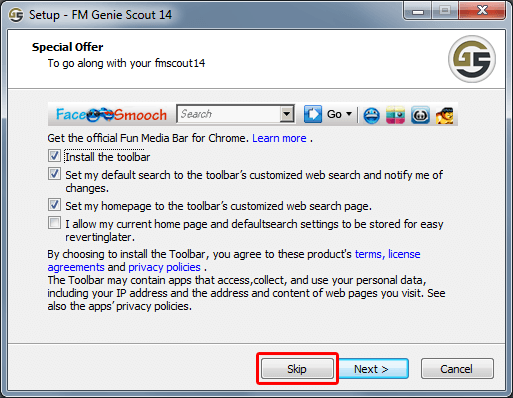
It's your choice to install or not install 1 offer at the beginning of installation. You should hit the "DECLINE" or the "SKIP" button if you don't want it.
Here are screenshots for both cases:
![]()
![]()
We don't control the offers shown during installation, but the ad agency we work with (Somoto) to bundle GS14 installer promises and insists there won't be any harmful offers for those who accept to install them.
When we receive a complaint regarding a particular "annoying" offer, we demand its removal from the campaign (we had to do that in 3 occasions since December). So if there's a specific offer you got installed despite declining it, please provide more details on what happened and we'll act on it.
I've personally run the installation multiple times. Then scanned the file and the entire computer with AVG, Malwarebytes, Microsoft Security Essentials and Ad-aware and NO virus or malware/adware was found.
Check the analysis of the exe file (latest version) by a Google owned company:
VirusTotal report for GS14 - You'll notice it's actually clean.
Here are screenshots for both cases:

We don't control the offers shown during installation, but the ad agency we work with (Somoto) to bundle GS14 installer promises and insists there won't be any harmful offers for those who accept to install them.
When we receive a complaint regarding a particular "annoying" offer, we demand its removal from the campaign (we had to do that in 3 occasions since December). So if there's a specific offer you got installed despite declining it, please provide more details on what happened and we'll act on it.
I've personally run the installation multiple times. Then scanned the file and the entire computer with AVG, Malwarebytes, Microsoft Security Essentials and Ad-aware and NO virus or malware/adware was found.
Check the analysis of the exe file (latest version) by a Google owned company:
VirusTotal report for GS14 - You'll notice it's actually clean.
1
