


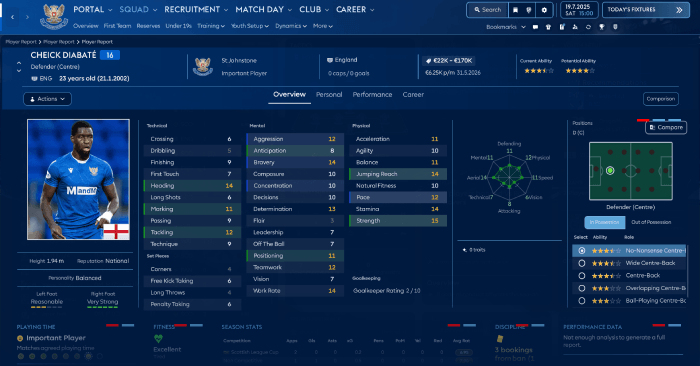
Updated on June 11th
ASF FM26 Skin Preview


How to install the ASF FM26 Skin
The skin can be installed using the program FM Skin Builder. You will be able to create your own colors and much more.You can install it manually by putting the files from the folder packages:


And put them in the folder with the replacement files:
C:\Program Files (x86)\Steam\steamapps\common\Football Manager 26\fm_Data\StreamingAssets\aa\StandaloneWindows64
For proper display of player photos in Player Profile and Player Report you must manually install the following 2 bundle files:
- ui-styles_assets_default.bundle
- ui-tiles_assets_all.bundle
First install all files - then install these two with replacement in the folder StandaloneWindows64.
CAUTION!!!! Make a backup of the original game files!!!!
My Twitter - https://x.com/LuckyLukeFM
My Patreon - https://www.patreon.com/LuckyLukeFM





![FM24 2025-26 Real Fixture & Results (Start in 2025) [FINAL VERSION]](https://www.fmscout.com/datas/users/realresult_artv2_257759.png)


Discussion: ASF Skin for FM26 v26.3.2
83 comments have been posted so far.
Will it be possible in the future to add club stadiums as in previous FM games?
Thanks for the reply and the amazing work on the skin!
Any idea how to fix the squad number showing like this?
But why is the staff's photo or even our own manager profile photo is zoom in so much in the profile page?
[img]https://cdn.jumpshare.com/preview/LUGRv1ZXS4Jzo8Q1HvIKzMGWZ4QYOC5vLfYIE3GQmP1Lk1y2GsbUSypSz-ltqjHZ5_zyOzMR1i_Yy4SZhHT5e5ezCF2f5TEzon_XNjuhCsI[/img]
And also where can I find the option to view club staff overview of u20 staff, u18 staff etc. where you normally can see the staff number of that category?
BETA 0.6.0-5!!! With the help of the program you can compile bundles for Mac
ui-tileslayouts_assets_all.bundle
ui-tableviews_assets_all.bundle
ui-tactics_assets_all.bundle. If I delete them and replace them with the original files, there's no longer a problem.
the game crash.
If I delete them and replace them with the original files, there's no longer a problem.
Skin have Graphic Error with Kitnumber
Thanks for the 01st Feb Update
If you use FM SKIN BUILDER software, then you have to use all the folders, following the instructions in the FM Builder download page.
If you want to do like I did , the fast way, just copy the content of ONLY the PACKAGES folder into the folder he mentioned above that is your Windows64 folder following this path
C:\Program Files (x86)\Steam\steamapps\common\Football Manager 26\fm_Data\StreamingAssets\aa\StandaloneWindows64
Finally a skin that makes everything clear and simple. And I like the coaches (Pep, Carlo Ancelotti, etc) in the first page background
Thanks for this