


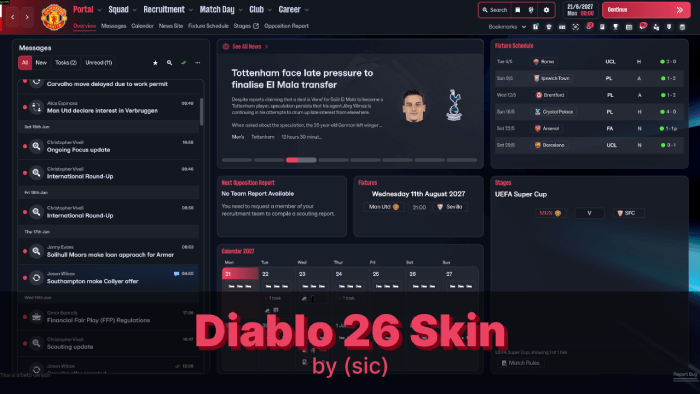
THIS THEME IS NO LONGER SUPPORTED. IT DOES NOT WORK.
I just don't have the time to update this every single week, when SI update their game. Don't expect any updates until SI make custom skins possible, or until someone in the community manages to make skins a reality. From the creator of Livid skins for previous FMs, the new Diablo 26 skin brings back the sleek dark theme - this time with red accents!
Currently, this is more of a custom theme than an actual skin with custom panels.
Together with people over at SI Forums and Discord, we managed to figure out how to change various colours, backgrounds, etc. Some of it was easier, some of it was difficult to find - but at this moment, I feel this first version of the skin is ready to be released!
With time, there will be updates - this is the earliest version of the skin.
There are many talented people in the modding community working hard to make this process easier for everyone - so I'm confident that very soon there will be more possibilities in terms of modding.
Notes
- Please note that this skin is primarily made for personal use. I understand everyone has different preferences, in regards to backgrounds, colors used, etc.
I will look to help out as much as I can, but please understand I can't accommodate everyone's preferences.
- Please also note that currently, some UI mods might not work together - if they replace the same file. This will most probably be changed soon with custom mods.
- Unfortunately, there seem to be issues with Mac. To my understanding this is due to how the files are bundled or compiled on Windows vs Mac - and it's something completely out of my control at this moment. Some files will work, some won't.
Backgrounds
Currently, the skin has overlays dependent on the competition you are in - just like the default game.If you want to have the same default background, without these overlays, I will post a file here that you will need to replace.
Coming soon.
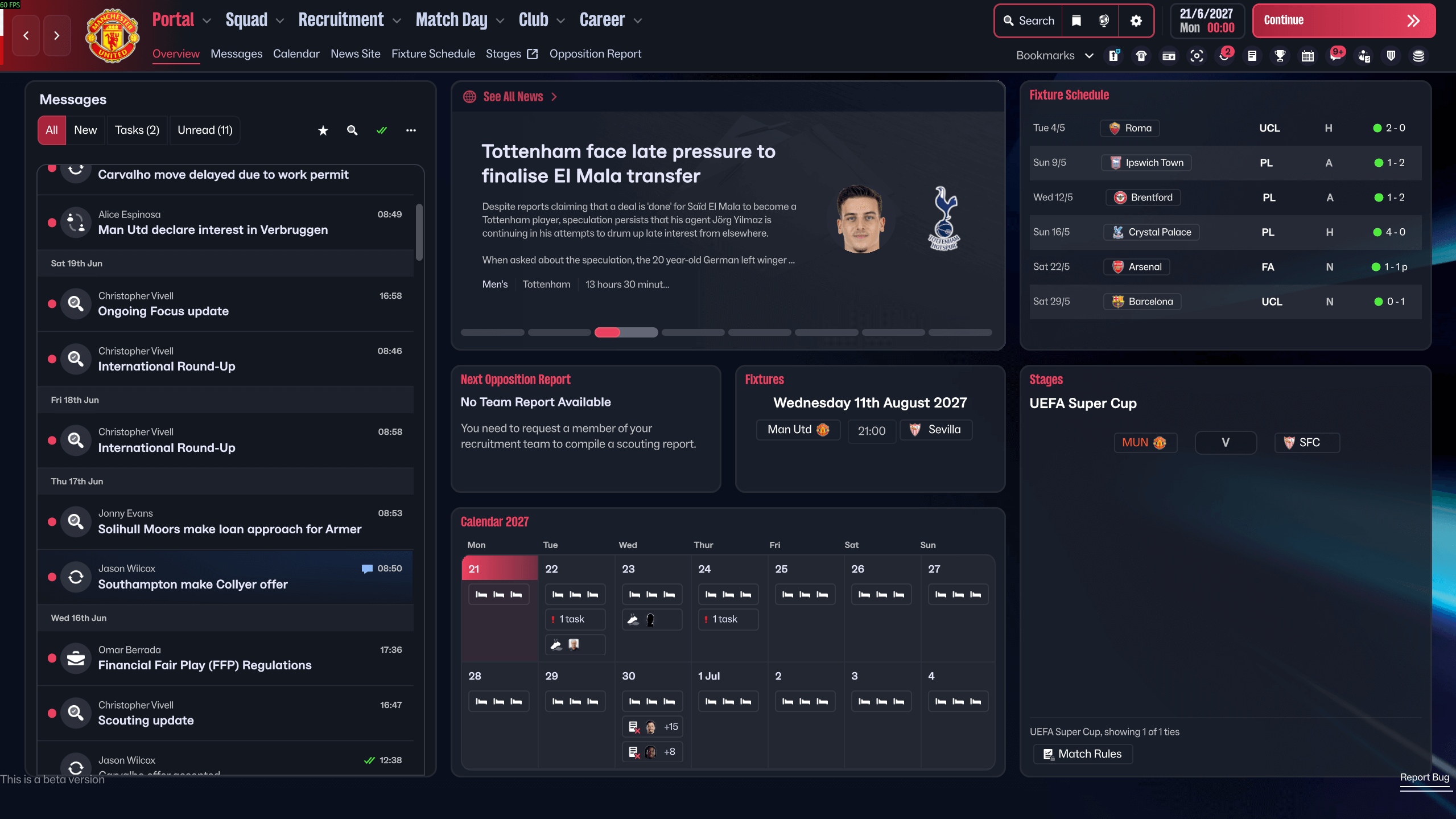
Diablo FM26 Screenshots


Additional Features
Currently, this skin includes custom attribute colors, with custom attribute ranges.Updates
v.0.4.1 - Small tweaks to one of the attribute color presets.- Removed certain files that were causing issues on Mac. Please note that the skin won't look 100% the same on Windows and Mac due to this.
v0.4 - Added multiple attribute preset color ranges, including a totally transparent one for everyone who likes to play attribute-less!
- Small tweaks to key/preferable attribute highlight.
- Small tweaks to table visuals.
- Separated Windows and Mac into 2 folders, to hopefully avoid any issues/crashes caused by one of the files on MACs.
v0.3 - Fixed the issue with player instructions not appearing.
- Added dark background option, without competition graphics.
v0.2 - Fixed the skin to work with the new update.
How to Install the Diablo Skin on FM 26
1. Extract the contents of the downloaded file.
You'll get 6 files inside the Windows folder:
- ui-datacollections_assets_all.bundle
- ui-preferences_assets_all.bundle
- ui-styles_assets_common.bundle
- ui-styles_assets_default.bundle
- ui-tactics_assets_all.bundle
- ui-widgets_assets_all.bundle
Mac folder will have a file less (ui-tactics_assets_all.bundle is not included as it seems to cause issues on Mac).
2. Locate the Game Directory: Navigate to your Football Manager installation directory.
The standard path for Windows is typically:
\Steam\steamapps\common\Football Manager 26\fm_Data\StreamingAssets\aa\StandaloneWindows64\And for Mac:
~/Library/Application Support/Steam/steamapps/common/Football Manager 26/fm.app/Contents/Resources/Data/StreamingAssets/aa/StandaloneOSX
3. Locate the original files (SEE ABOVE) in the game's data folder and make a backup copy before proceeding.
4. Copy and paste the files into the game directory. When asked, choose to overwrite/replace the existing files.
5. Enjoy!







Discussion: Diablo 26 Skin by (sic) v0.4.1 - NO LONGER SUPPORTED
58 comments have been posted so far.
HIGHEST - RED->GREEN->WHITE (DEFOULT)->GREY
Can i use this attribute colour tool to change them or skin will fck up?
Hi, yes this appears to be a Mac issue. Unsure why it happens, but some users have narrowed it down to 2 files - ui widgets and ui tactics. You can try using the skin without those 2 files.
@Manager34 - you can, but only the default preset is "finished" - I will post an update today that fixes the other 3 presets as well.
@Saran1991 - are you using the new beta release? If not, then you might need to wait for the patch to officially drop.
@dosh - thanks - yes, something like that is planned - I will post a few versions of the BG.
@luckyluke26 - Thanks. I'm not exactly sure what exactly that is, and if I haven't noticed it yet - I probably am not going to update it any time soon
Just a small suggestion: could you maybe add a version with a solid black background instead of the grass one?
Thanks again for your awesome work. Really appreciate the effort you’ve put into this!
I can use the 4 new presets for attributes colours which are in the game since the update even with your skin, right? Or would that cause any problems?
For now, it is fixed!
So it's both of these files after all? This is really strange.
For now I will put a disclaimer not to use these 2 files if you're on MAC, but I don't think there's much I can do - until SI fix the game.
@Vinish0w - You can change the ranges, yes. This is located in ui-datacollections_assets_all.bundle - file: AttributeDataCollection
You'll see an array with 7 items, from -1 to 20. I have added an additional colour range to my skin, but you can remove it. When doing so, please remember to update the number of items in the array.
0 int data = 17 - this means this range ends at 17, from 18 onwards it will be a different color.
I would like to change it to 1-5, 6-10, 11-15 and 16-20. How do I do that? For now, just changing the colors makes the range 1-5, 6-8, 9-11, 12-15, 16-17, 18-20 I guess. And I'm basically using 2 ranges of the same color to make 9-15 all yellow... but my intention was to return the range to how it was before by removing some, or to be able to change the values.
Thanks mate. It is possible to change that.
ui-styles_assets_default.bundle - there's a file inside FMColours, near the bottom, there are 6 color values (from [175]-[180]) that control each range. You can modify each r g b a value to whatever you want.
I'm using UABEA to open these bundled files, and edit files within.
Hopefully there will be a better way to do all of this, and more easier for regular users as well. After all, we are in very early stages of skinning/modding.
I wouldn't have even released the skin until we actually got the tools to make separate skin folders, and until it was easier for all of you to make any tweaks to it you would like - but I know many people are very unhappy with how the game looks by default.
Hmm...it could be the custom attributes doing something, but I just do not understand why it would mess with that part of the UI, and only on Mac at that... Possibly a bug within the game itself, that was triggered by some of the changes I made.
If you want to double-check, you can go file by file, to pin point which one of those 3 is making the issue, so I can see if I can modify it.
Hi mate, not sure what this could be - as it seems to be only affecting mac PCs.
Can you try to install the skin, without ui-tactics_assets_all.bundle - file? Or rather, if you have backed up the files, just replace that one to the default/backed up file - to see if it works.