


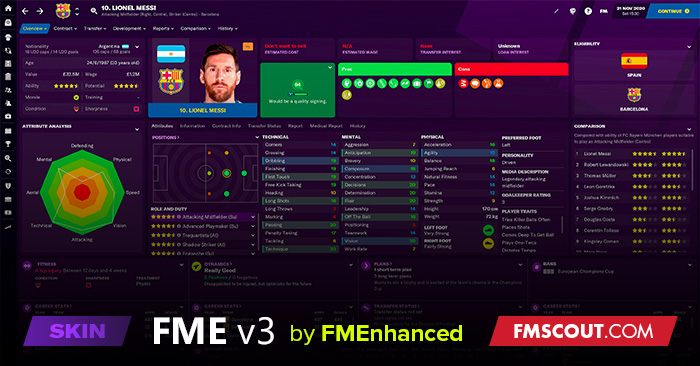
Several months ago during the release of the BETA, I released a skin called FME (Football Manager Enhanced) which was intended to be an extension of what Sports Interactive provide as opposed to a complete overhaul. I intended to keep everything in keeping with the default look and feel of the game for a more seamless integration and ease of use.
Upon release of FME, I received some wonderful feedback from users and fellow modders, though with limited time I was unable to keep up with demand for extra features/bug fixes etc. Having gained more time over the past month, I have rebuilt FME and have stripped it back for the sake of simplicity.
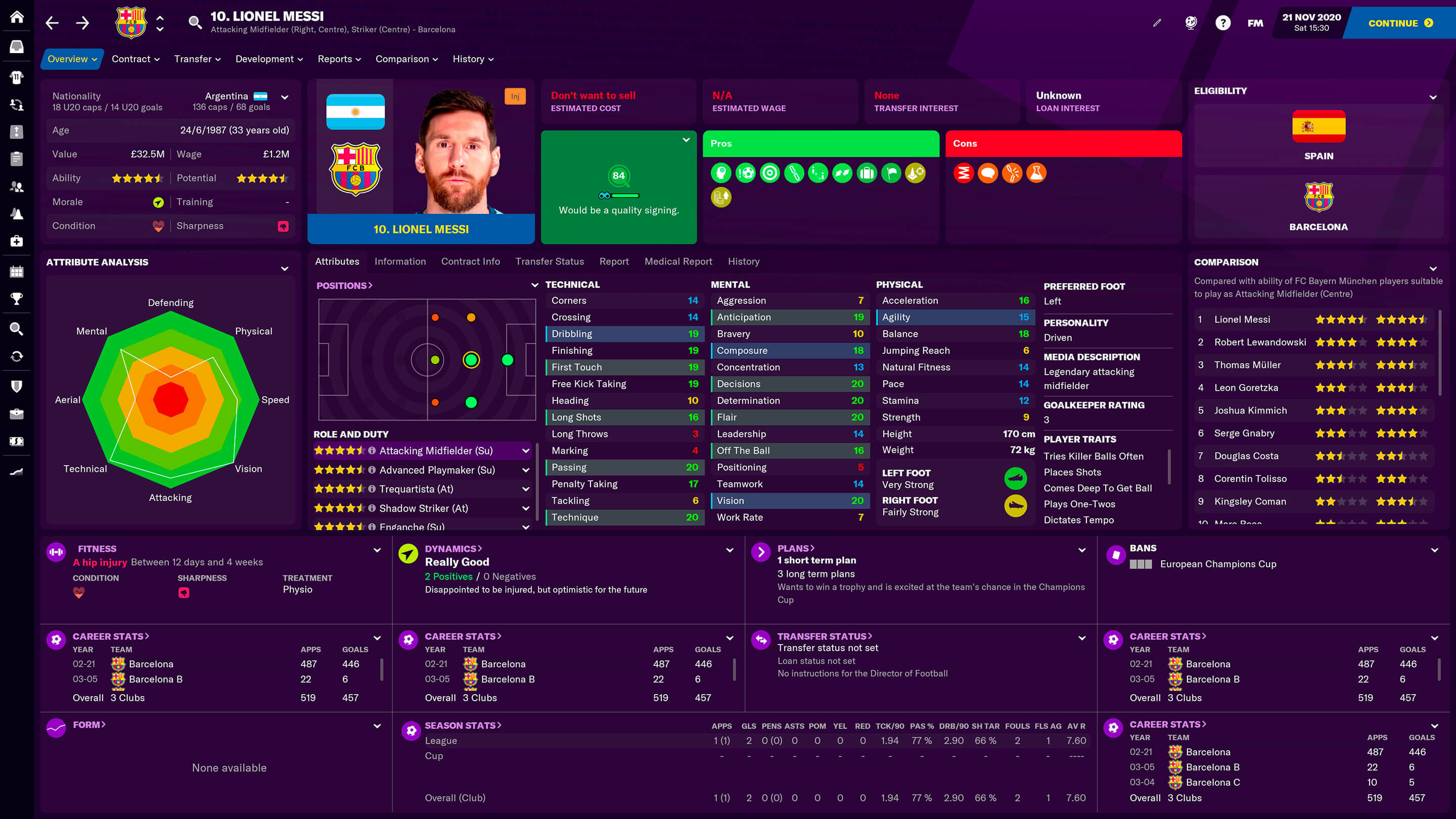
Football Manager Enhanced - v3.0
If you're familiar with FME, you may be sad to learn that this version of the skin is currently only a Player Overview panel with little or no modding elsewhere. I have taken a quality over quantity approach and perhaps with more time in the future, I'll be able to rebuild the club page that I originally built. I have discovered several things that have never before been done and it would be nice to reveal them in a future update. For now though, FME is an upgraded default skin with an enhanced Player Profile.


Transfer/Scouting Labels
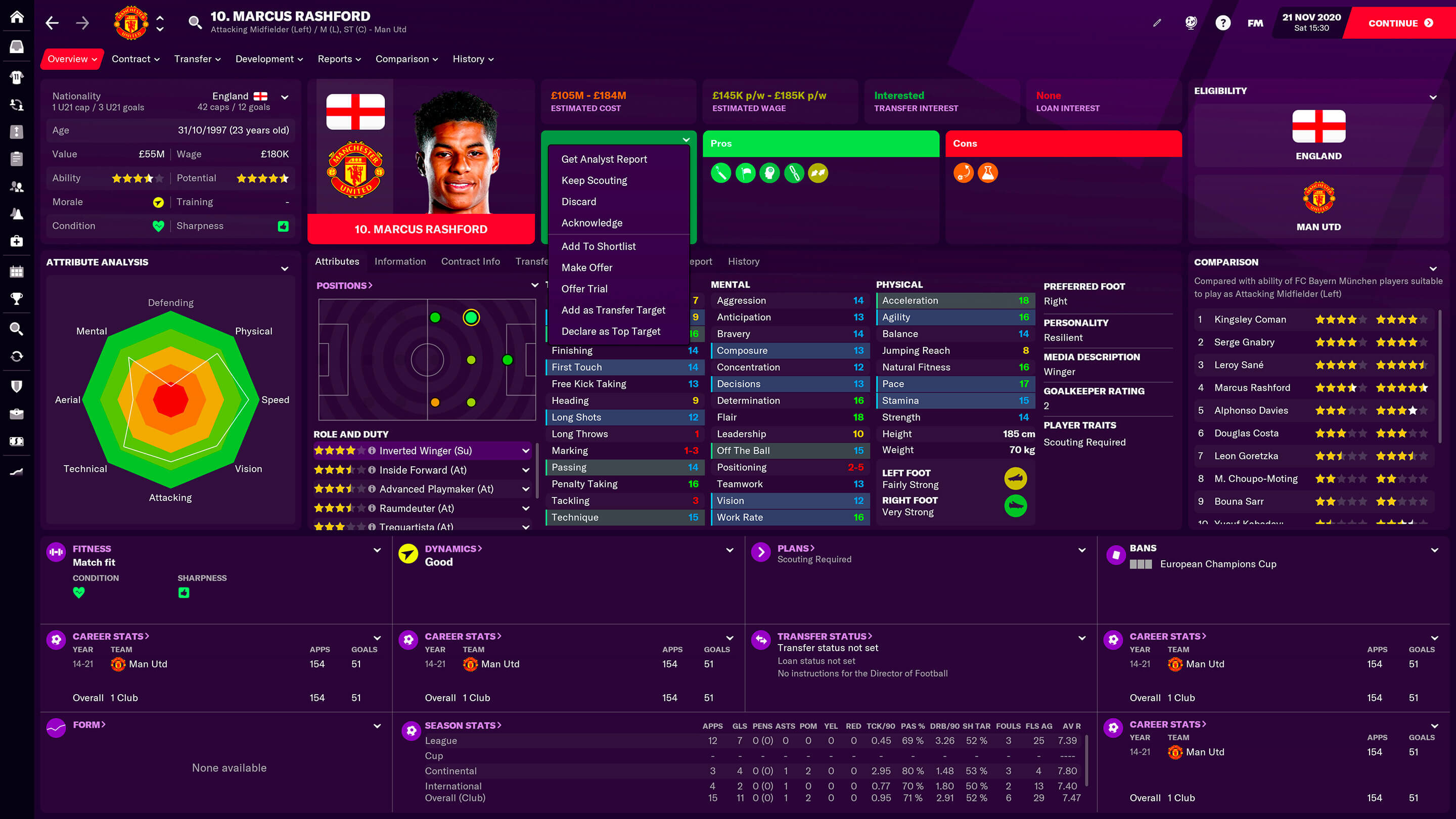
Player profiles show Dynamic Transfer Labels which change with context. When a player has been scouted, the "Transfer" labels are replaced with the "Transfer Interest" labels, better integrating the scout report with the player profile and giving you a quick idea of how much a player might cost.
Transfer Actions
Transfer actions are available directly from the Scout Feedback Block via a dropdown menu. Additionally, clicking on the Scout Rating Circle, or indeed any of the Transfer Labels will take you directly to the full Scout Report.
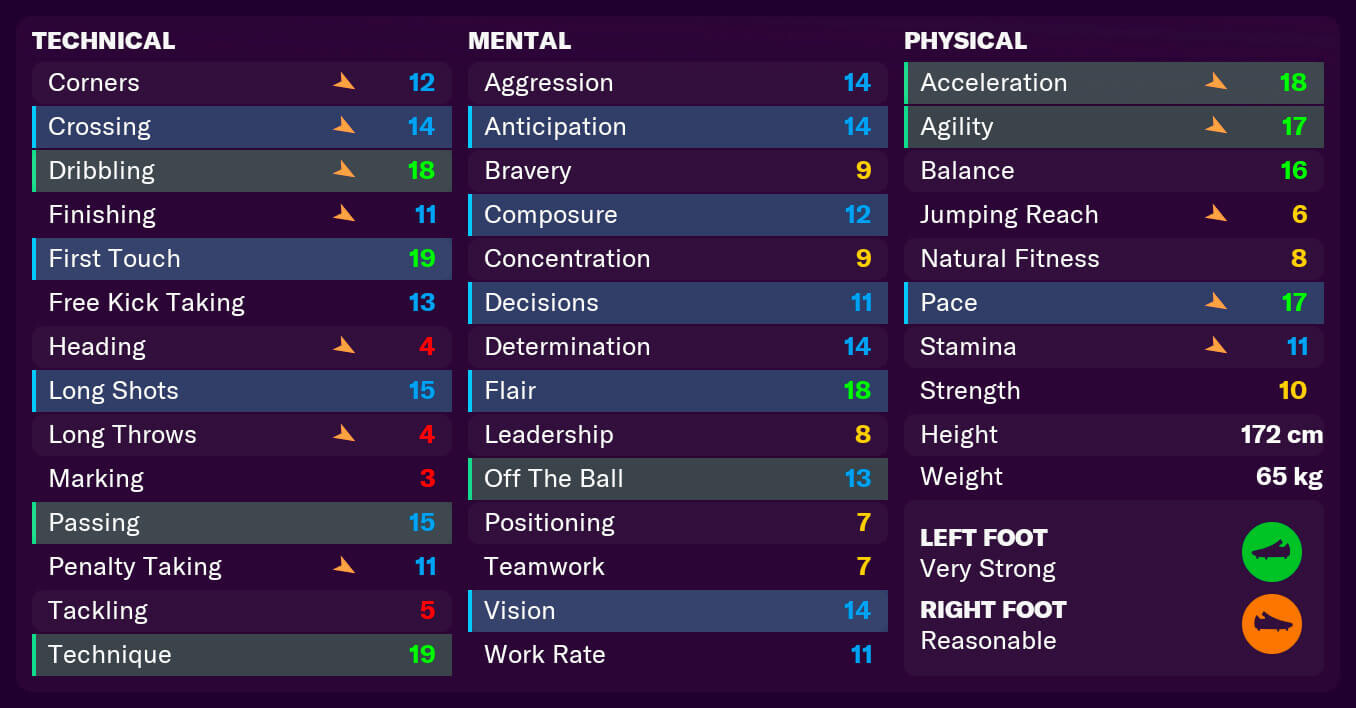 | 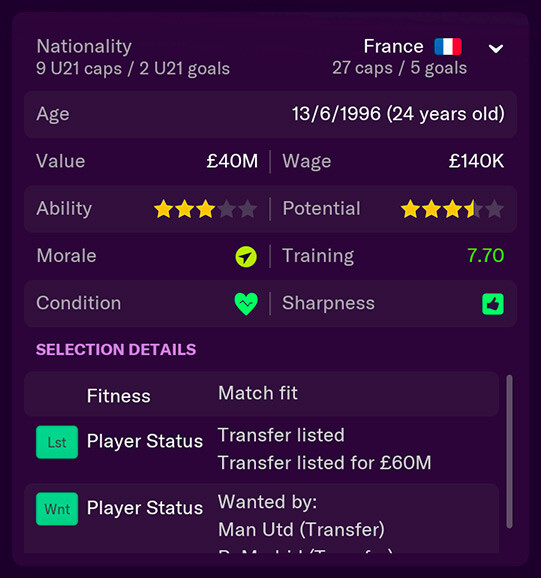 |
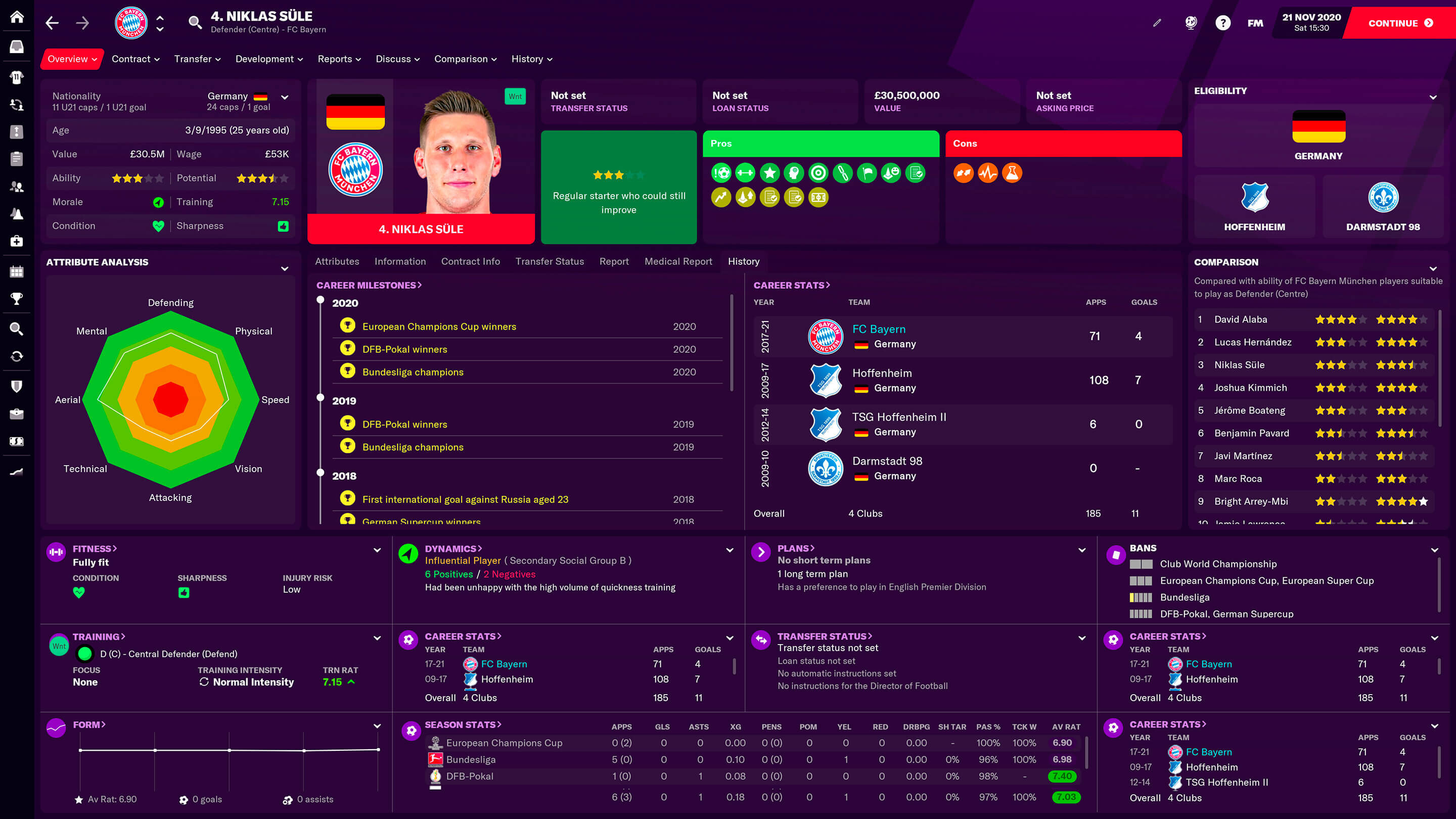
Touch versions of the game present different attribute colours which I have modified and introduced into FME. Red highlights low attribute values, Yellow for moderate values, Blue for good values and Green for excellent values. Foot strength is of course also present underneath the Physical Table. Additionally, I have implemented a better Player Information block which I believe provides all of the essential basic information required when viewing a player.
Additional Tabs
In addition to the default Attributes tab, I have made several other tabs available which I have optimized to function in a much smaller space. Player Information, Contract Information, Transfer Information/Status, Player Report, Medical Report & History are all available to access directly from the Player Overview.
Feel free to download FME v3.0 and perhaps even use it purely as a standalone Player Overview Panel within another creators skin.
August 2021 Update
Work has kept me from being able to properly update anything else within the game and as such there is unlikely to be any more updates for FM 2021. However, due to the overwhelming positive response, I will be sure to make several key updates for FM 22. I have flagged several things within the game which I could definitely update somewhat to make the overall experience a lot more useful and I will hopefully have the time to incorporate those additions in future releases.
Football Manager Enhanced - v2.4
FME had decided to step away from the FM community at the time and it was uncertain if he'd ever return. I asked him to keep the last version of the skin here because a lot of people enjoyed using it, and he agreed. However, we can't offer support for any technical inquiries you might have. Thanks for understanding!
-Stam
-Stam
DOWNLOAD OPTIONS
Download v3.0The v3.0 downloadable is mainly a Player Overview panel with little or no modding elsewhere.
Download v2.4
The v2.4 downloadable pack includes 2 versions of the skin.
- FME (Regular)
- FME Dark
RESOLUTION & SCREEN SIZE
FME v3.0FME adapts better than before to smaller resolutions. If you have a very low res screen (1024x768), you'll have a slightly limited experience as there simply isn't enough space to display all the required elements. However, stepping up to 1600x900 and 1920x1080, you have a fuller experience with greater functionality as per the images below.
FME v2.4
- Resolutions from 1024 x 768 to 1920x1080 are fully supported.
- If you are at 1920x1080 but not getting the "Full Experience" it is because you are not scaled at 100%. At 1920x1080 on small screens, Windows scales your screen to 125% which gives you less screen space but makes elements easier to see/read. Change this to 100% in Display Settings and you will receive the "Full Experience".
- To get the most out of this skin, you must have at least 1000 pixels vertically and 1600 pixels horizontally, though unlike all other skins, this skin will not break, have squashed elements or become unusable below its recommended resolution.
How to install the FME FM21 Skin
- Download the .zip archive and use a tool such as 7-zip for Windows or The Unarchiver for MacOSX to extract its contents.
- Move the extracted folders to your skins folder:
\Documents\Sports Interactive\Football Manager 2021\skins\ - Run Football Manager 2021 and go to Preferences > Interface.
You should see "FME" and "FME Dark" as options in the skin drop down of the General options section.
Hit the Confirm button.
Please note this skin is provided as is. It has nothing to do with Sports Interactive or SEGA and won't be supported by them.



![FM26 Data Tweaks [v3.2 | v4.7]](https://fmdatatweaks.com/wp-content/uploads/2026/04/fm-datatweaks.webp)



Discussion: FMEnhanced v3.0 FM21 Skin
185 comments have been posted so far.
The aim was to have the skin available for release day so that people beginning new saves would have more dynamic views for their clubs and players etc.
I am currently working on fixing the minor issues and adding the extra small things that many people have requested.
International and youth caps/goals are present on the screen already next to the player picture and eligibility is accessible via the attributes panel. Player foot strength will be added and it will be possible for lower res users to see their stadium picture and all five staff members as opposed to three. Clubs without third kits will no longer have a white third kit etc.
Keep posting your suggestions and as time moves on, your favorite features will become part of FME.
Happy Gaming!
Quick note: Year Founded is displaying as a countable number, rather than just a year :-)
one detail: with the release of full version of the game on the matchgame menu the space around the pitch is purple again (on 2D view) that didnt happen on beta, is it possible to fix?
Pure class.
Looking forwoard to see a light version.
Well done and thank you!
Any possibility of being able to change the tabs at the bottom of the club page though? When looking at a club I can't say I'm too fussed about their squad statuses or their team injuries.
And when viewing a player, being able to see how many caps/u21 caps they have would be nice too, or seeing their star rating (is that the correct term?) instead of their weight, height, wage etc being across the whole screen. Good work though! Liking the dark skin so far
One question/feature request. Would they be any possibility of adding the drop down box on the teams 'profile' to include a finance & salary tab? A lot of skins last year gave us the option to show that.
Thanks again for the skin really love it!
Just wondering how I get the high resolution version of the club overview page? Currently I am seeing the low resolution one but my fm21 is set to full screen 1920 x 1080. Also manager appears as a key player.
Cheers
Thanks for the great work.. just one addition//request..
Can you please add a rating/stars for the facilities in the club home page.. maybe it can be selected from the drop down menu on the right
can i ask, can you insert background picture and also stadium pics on the schedule tab?
@ore24 That's unusual. What club? Do you have a screenshot?
@EmmaCarroll As I wanted to get it out for release day, a couple other things got pushed back such as tactics icons etc. They will be added in due course. I will post on here and Twitter when I update. @FMEnhanced.
@Rivanov, I'll look into adding eligibility somewhere. It is currently accessible via the selector panel which holds the attributes.
@MaisDis, as always, open the ZIP folder and place FME and FME Dark into your skins within Documents/Sports Interactive/FM21 etc.
@SlimeRondo, unfortunately I cannot test for Mac as I only have a PC. I've read similar issues with other skins. Hopefully something can be ironed out for you going forward.
As always, thank you all for the feedback. I'm having a small break before the next update as I am half dead ✌️
Thanks for your job.
How do install the skin please ?