


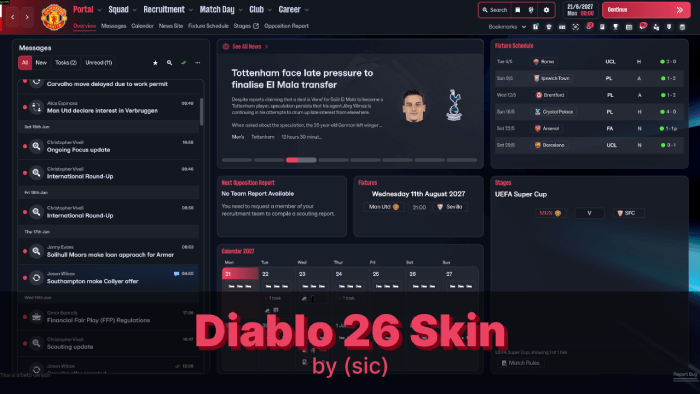
THIS THEME IS NO LONGER SUPPORTED. IT DOES NOT WORK.
I just don't have the time to update this every single week, when SI update their game. Don't expect any updates until SI make custom skins possible, or until someone in the community manages to make skins a reality. From the creator of Livid skins for previous FMs, the new Diablo 26 skin brings back the sleek dark theme - this time with red accents!
Currently, this is more of a custom theme than an actual skin with custom panels.
Together with people over at SI Forums and Discord, we managed to figure out how to change various colours, backgrounds, etc. Some of it was easier, some of it was difficult to find - but at this moment, I feel this first version of the skin is ready to be released!
With time, there will be updates - this is the earliest version of the skin.
There are many talented people in the modding community working hard to make this process easier for everyone - so I'm confident that very soon there will be more possibilities in terms of modding.
Notes
- Please note that this skin is primarily made for personal use. I understand everyone has different preferences, in regards to backgrounds, colors used, etc.
I will look to help out as much as I can, but please understand I can't accommodate everyone's preferences.
- Please also note that currently, some UI mods might not work together - if they replace the same file. This will most probably be changed soon with custom mods.
- Unfortunately, there seem to be issues with Mac. To my understanding this is due to how the files are bundled or compiled on Windows vs Mac - and it's something completely out of my control at this moment. Some files will work, some won't.
Backgrounds
Currently, the skin has overlays dependent on the competition you are in - just like the default game.If you want to have the same default background, without these overlays, I will post a file here that you will need to replace.
Coming soon.
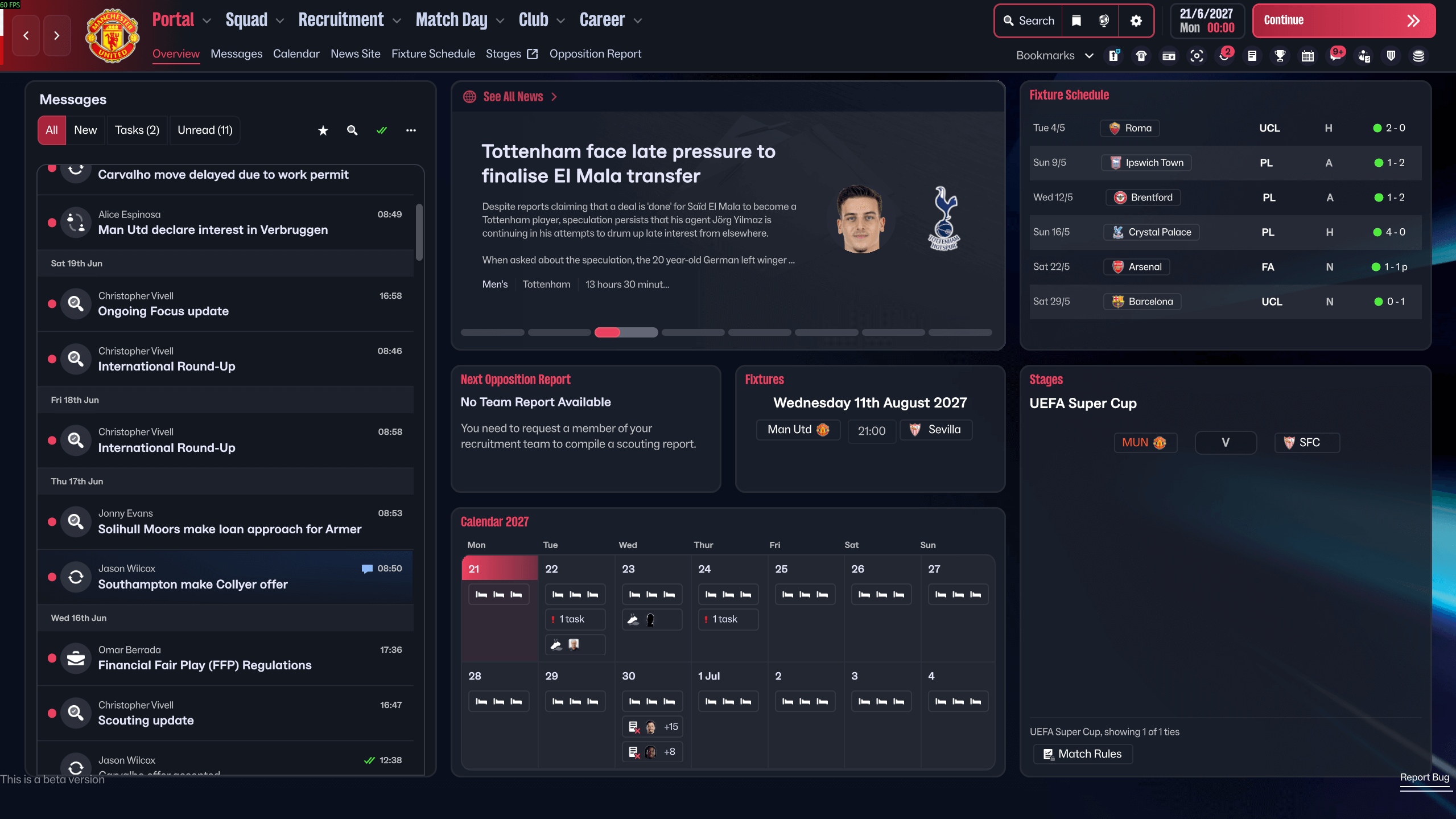
Diablo FM26 Screenshots


Additional Features
Currently, this skin includes custom attribute colors, with custom attribute ranges.Updates
v.0.4.1 - Small tweaks to one of the attribute color presets.- Removed certain files that were causing issues on Mac. Please note that the skin won't look 100% the same on Windows and Mac due to this.
v0.4 - Added multiple attribute preset color ranges, including a totally transparent one for everyone who likes to play attribute-less!
- Small tweaks to key/preferable attribute highlight.
- Small tweaks to table visuals.
- Separated Windows and Mac into 2 folders, to hopefully avoid any issues/crashes caused by one of the files on MACs.
v0.3 - Fixed the issue with player instructions not appearing.
- Added dark background option, without competition graphics.
v0.2 - Fixed the skin to work with the new update.
How to Install the Diablo Skin on FM 26
1. Extract the contents of the downloaded file.
You'll get 6 files inside the Windows folder:
- ui-datacollections_assets_all.bundle
- ui-preferences_assets_all.bundle
- ui-styles_assets_common.bundle
- ui-styles_assets_default.bundle
- ui-tactics_assets_all.bundle
- ui-widgets_assets_all.bundle
Mac folder will have a file less (ui-tactics_assets_all.bundle is not included as it seems to cause issues on Mac).
2. Locate the Game Directory: Navigate to your Football Manager installation directory.
The standard path for Windows is typically:
\Steam\steamapps\common\Football Manager 26\fm_Data\StreamingAssets\aa\StandaloneWindows64\And for Mac:
~/Library/Application Support/Steam/steamapps/common/Football Manager 26/fm.app/Contents/Resources/Data/StreamingAssets/aa/StandaloneOSX
3. Locate the original files (SEE ABOVE) in the game's data folder and make a backup copy before proceeding.
4. Copy and paste the files into the game directory. When asked, choose to overwrite/replace the existing files.
5. Enjoy!






Discussion: Diablo 26 Skin by (sic) v0.4.1 - NO LONGER SUPPORTED
58 comments have been posted so far.
I do not know if this helps, but I have installed other skins and did not have the same issue.
Could you help me with that?
Hi. Thank you.
Unfortunately, this won't work if you use a third-party tool to change colors.
Currently, the way "skins" work, is that they replace entire .bundle files. These bundles contain several different files inside, but right now third-party tools (like attribute color picker) cannot replace only 1 file inside (let alone a line of code) - instead they replace the entire bundle.
These tools also either use their own custom naming for each attribute color, or they use certain colors that already exist in the game - both of which are different to the way it works on my end.
As I have mentioned in the post, some UI mods might not work together. We are still in very early stages of customization and modding.
Lovely skin
One question though
Why cant I change the attribute colors?
When I use my own they just go white
This is what I was talking about in regards to backgrounds. Everyone has their preferences, so I will be looking to add more versions (possibly one for each colour style to match with the club you're managing). Unfortunately, we are still some way off from having an in-game background changer.
You can do it [img]https://ibb.co/BVCytWj8[/img]