


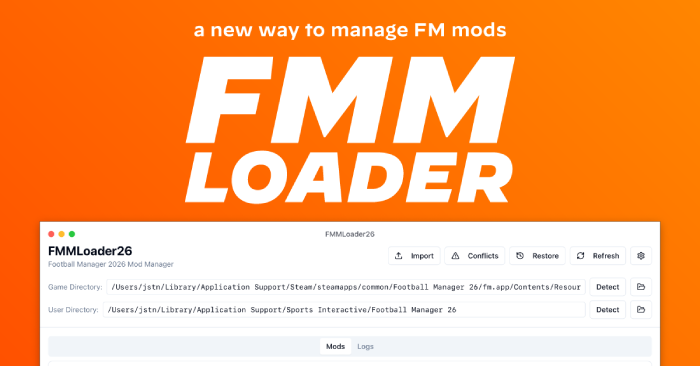
by Justin Levine (JALCO / notJalco)

Download: Latest Release (Windows • macOS • Linux)
Discord: Join the community for help
Wiki/Docs: GitHub Wiki
What is it?
FMMLoader26 is a simple, safe mod manager for FM26. Drag-and-drop mods, auto-detect your FM folder, apply or roll back with one click, and resolve conflicts automatically. Supports UI bundles, tactics, graphics, skins, and more.
Key Features
- Zero install (portable EXE on Windows / App bundle on macOS / binary on Linux)
- Drag & drop imports (.zip, .bundle, .fmf, or folders)
- Auto-detects Steam & Epic FM26 paths
- Type-aware install (UI/Tactics/Graphics → correct folders)
- Restore points before every Apply (easy rollback)
- Conflict Manager (shows winners by load order)
- Load Order control (last-write-wins)
- Detailed logs for troubleshooting
- Manifest support (dependencies, conflicts, metadata)
System Requirements
- Windows 10/11, macOS 10.14+, or Linux 64-bit
- ~100 MB free (plus space for mods)
- Football Manager 2026 installed (Steam or Epic)
Installation
Windows
- Download FMMLoader26.exe
- Double-click to run (portable, no installer)
- If SmartScreen warns → “More info” → “Run anyway”
macOS
- Download and unzip FMMLoader26.zip
- Drag FMMLoader26.app to Applications
- First launch: Control-click → Open (bypass Gatekeeper once)
Linux
- Download FMMLoader26-Linux.tar.gz from the latest release page
- Extract it anywhere (e.g. your home folder)
- Make it executable if needed:
chmod +x FMMLoader26
./FMMLoader26
Tip: Create a desktop shortcut or add FMMLoader26 to your Applications menu for quick access.
First Run: Set Your FM Folder
Try Detect Target first. If needed, set manually. Common paths:
Windows (Steam)
C:\Program Files (x86)\Steam\steamapps\common\Football Manager 26\fm_Data\StreamingAssets\aa\StandaloneWindows64
Windows (Epic)
C:\Program Files\Epic Games\Football Manager 26\data\StreamingAssets\aa\StandaloneWindows64
macOS (Steam)
~/Library/Application Support/Steam/steamapps/common/Football Manager 26/fm.app/Contents/Resources/Data/StreamingAssets/aa/StandaloneOSX
macOS (Epic)
~/Library/Application Support/Epic/Football Manager 26/fm_Data/StreamingAssets/aa/StandaloneOSXUniversal
Linux (Steam Proton prefix)
~/.steam/steam/steamapps/common/Football Manager 26/data/StreamingAssets/aa/StandaloneLinux64
How to Use
- 1) Import: Drag a .zip/folder/.bundle/.fmf into the app (or use “Import Mod…”). If no manifest is found, FMMLoader prompts and creates one.
- 2) Enable: Select a mod → “Enable (mark)”.
- 3) Order: Move Up/Down if multiple mods touch the same files.
- 4) Apply: Click Apply to install mods (FM must be closed).
- 5) Rollback: Use “Rollback…” to restore from backups (keeps last 10).
Supported Mod Types & Formats
- UI / Bundle → Game data folder (UI tweaks, stadium/match UI)
- Tactics → User tactics folder (4-4-2, gegenpress, KNAP sets)
- Graphics → User graphics folder (kits, logos, faces)
- Skins → User skins folder (custom themes)
- Misc → User folder (other mods)
Troubleshooting
- “No valid FM26 target set” → Detect Target or manually select the Standalone folder.
- Mods not appearing → You must click Apply and restart FM26.
- “FM is running” warning → Close the game completely (Task Manager / Activity Monitor).
- macOS won’t launch → Control-click the app → Open (first time only).
- Linux permissions → Use chmod +x FMMLoader26 if it won’t start.
For Modders (manifest.json)
Use a manifest to define metadata, dependencies, and install paths.
{
  "name": "My Awesome Mod",
  "version": "1.0.0",
  "type": "ui",
  "author": "YourName",
  "homepage": "https://yoursite.com",
  "description": "A brief description of what your mod does",
  "files": [
    { "source": "ui-stadium.bundle", "target_subpath": "ui-stadium.bundle" }
  ],
  "compatibility": { "fm_version": "26.0.0" },
  "dependencies": [],
  "conflicts": [],
  "license": "CC BY-NC-SA 4.0"
}
Full guide: Modders Guide (GitHub)License & Disclaimer
Licensed under CC BY-NC-SA 4.0 (non-commercial share-alike with attribution).Not affiliated with Sports Interactive or SEGA.





Discussion: FMMLoader26 - A cross-platform Mod Loader for Football Manager
9 comments have been posted so far.
Just to be sure... it does make a back-up.. Right?
Like, if it says in the instructions: "back-up file X before proceeding" the tool does this for you, right?
Yes, it is fixed.
Am I doing something wrong?