


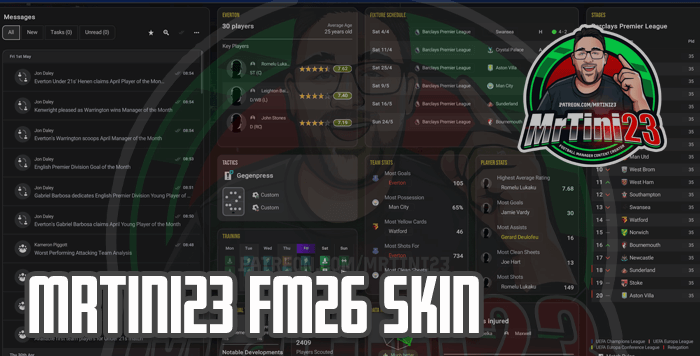
Note: This skin is built to my personal spec. If you want to change it, you can use the SkinBuilder version to make changes. Help and support available on Discord
Here we are, the first release of a skin I've ever done! Thanks to Lotsgon and his excellent Skin Builder tool, we have been able to edit not only colours but also tile layouts, giving the game a fresh feel and making things a little bit easier to see. A version with default colours is also available.
MrTini23 Skin Preview


Copy and Paste Install
X User LastManBalling has created a handy video tutorial here:For those who don't want to make any changes to the skin, there is the option for a copy-and-paste install. In the download folder, you will find a 'Copy + Paste' folder which will contain bundle files. One set of bundles is for the dark skin and the other is for the default colours with the changed layouts.
Choose which one you want to use and copy all of the bundle files. Then paste them into your game installation files.
The default location for PC Steam users is
C:\Program Files (x86)\Steam\steamapps\common\Football Manager 26\fm_Data\StreamingAssets\aa\StandaloneWindows64pYou will be prompted to replace files; do this. The MAC file location will differ; to find it, in the Football Manager folder, you need to right-click the Football Manager icon and click ‘show package contents’ . The files will then show up. From there, navigate to the bundles folder as above.
It is also good practice to make a backup of anything you replace before installing.
FM Skin Builder Install
A tutorial by ZimsMula on how to use Skin Builder can be found here:IMPORTANT
Whenever a patch is announced, restore to the original game files before the patch is rolled out and downloaded. This will mean the Skin Builder tool always uses the most up-to-date default files.
To do this on Steam, right click on Football Manager 26, click properties, installed files then choose Verify Integrity of game filesWhenever a patch is announced, restore to the original game files before the patch is rolled out and downloaded. This will mean the Skin Builder tool always uses the most up-to-date default files.
This installation method is for anyone who fancies making changes to the skin. There will be a tutorial video coming out for this soon, which I'll link as soon as I have it.
The first thing you need to do is download the FM Skin Builder tool that can be found here https://fmskinbuilder.com. Make sure to always download the latest beta version. Help and support for using the tool can be found in the FM Matchlab Discord here: https://discord.com/invite/Dr9gaChvRG
To do this, make sure beta is highlighted, then go ahead and download the installer and run it.
Once installed and run for the first time, the program should create a skins folder in your Documents folder (Documents\FM Skin Builder\skins).
Download the skin zip file below, unzip and copy the MrTini23 v1.0 Skin folder from the Skin Builder version folder. Then go over to the skins folder inside the FM Skin Bulder folder and paste the skin here.
With that copied, open up the skin builder tool, which by default is installed in C:\Program Files\FM Skin Builder.
The first thing to do will be to make sure the tool is finding the bundle files it needs. To do that click on the cog bottom left. Locate the Game Bundles Directory and click browse. You then need to select the folder where the FM bundles are located. Typically on PC this is
C:\Program Files (x86)\Steam\steamapps\common\Football Manager 26\fm_Data\StreamingAssets\aa\StandaloneWindows64
Once that has been selected, click on explorer at the top left. Click on open skin and select the MrTini23 skin. The skin will then be loaded. I won't go into how to edit it here, since the tutorial video will cover that. We'll skip to installing. To install, click on build on the left-hand side. Then click build on the top right and the tool should build the skin. The tool will take a minute or two to build the skin files. Now make sure FM is closed! Once it is done, click apply to game and you are ready to play FM with a fresh look and feel!
Credits
TinyHips and Ferrigi97 for sharing their pre-match lineupsDarkside for allowing me to use his skin as a base to learn from and use the colour base
Lotsgon for his excellent tool, which has changed the skinning game
Sasmaz for allowing me to use his excellent scouting table templates
Everyone else at the Match Lab Discord who has helped with the discovery of new features


![FM26 2025-26 Real Fixture & Results [4-2-2026]](https://www.fmscout.com/datas/users/realresult_thumb_25_26_fm26_257759.png)




Discussion: MrTini23 FM26 Skin v1.3
No comments have been posted yet..