


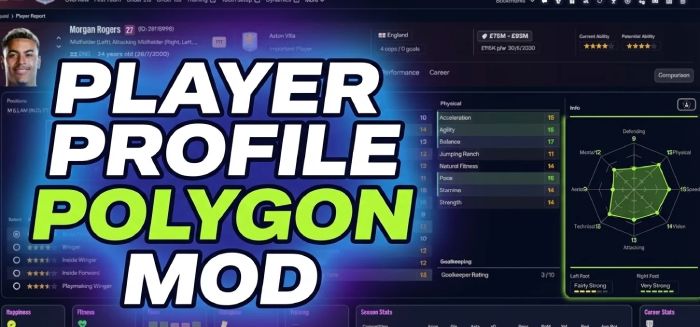
This mod was built by myself using my tool FM Skin Builder which allows you to patch the game files for styles, images, icons and more (fonts and uxml in the near future).
For any feedback or to follow progress please join the discord which is linked on the site.


Notes:
This mod can be used with other skins but will likely overwrite specific values set within the ui-tiles_assets_all.bundle as you have to replace it
This mod will only work on screen sizes upwards of 1080p for now I believe as it only mods the ‘Large’ player profile in game.
This mod will only work on screen sizes upwards of 1080p for now I believe as it only mods the ‘Large’ player profile in game.
To install:
1. Download and unzip the folder.2. Navigate to StandaloneWindows64/StandaloneOSX:
Windows
C: (or your installation drive)/Program Files (x86)/Steam/steamapps/common/Football Manager 26/fm_Data/StreamingAssets/aa/StandaloneWindows64
~Library/Application Support/Steam/steamapps/common/Football Manager 26/fm.app/Contents/Resources/Data/StreamingAssets/aa/StandaloneOSXAlternatively, you can navigate to the Football Manager 26 folder by clicking the ‘cog’ next to the game screen on steam:
manage -> browse local files
3. Backup the file in StandaloneWindows64/StandaloneOSX that have the same name as those in '.bundle', in case you need to revert your game files:
- ui-tiles_assets_all.bundle
*You can backup these files to another folder or rename the original file by adding a .bak suffix e.g. ui-tiles_assets_all.bundle.bak*
4. Drag and drop the ui-tiles_assets_all.bundle file from the relevant mod platform folder (Windows/Mac) into StandaloneWindows64/StandaloneOSX.
5. Click replace.
6. Start Football Manager 26 and enjoy!

![FM26 International fixes & Nationalities update [Final Version out]](assets/downloads/fm26/fm26-international-fixes-and-nationalities-update.th.jpg)



![FM26 Data Tweaks [v3.6 | v5.2]](https://fmdatatweaks.com/wp-content/uploads/fmdt-cover.webp)


Discussion: FM26 Player Profile Polygon
7 comments have been posted so far.
Would love to have it working again, such a good mod.
Using this mod now breaks my player search panel in recruitment.
Something like this is also missing when comparing players