


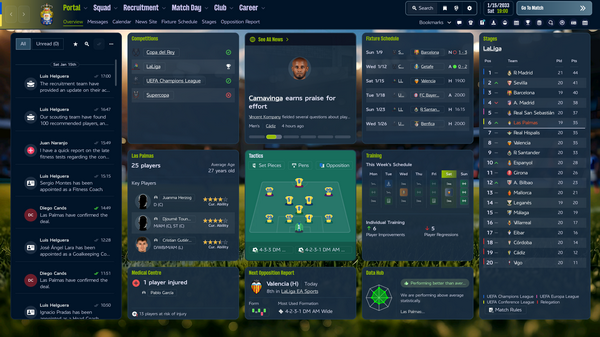


Skin in the Navy Blue color scheme. Optimized several vanilla screens to suit my needs. Changed fonts and backgrounds
The concept is based on displaying the most important team management elements on the portal screen
!!! If you want to use the default colour scheme, just do not copy ui-styles_assets_default.bundle from the archive or replace it with the original file if you have already copied it into the bundles folder

Thanks to the creator of FM_Skin_Builder Tom aka Lotsgon and FM Match Lab community for sharing their knowledges about FM26 skinning


*******
Update 1.0.9 - updated to FM 26.3.2 patch
Update 1.0.8 - updated to FM 26.3.1 patch
Update 1.0.7 - Added new optional colour theme - Emerald Green. No new features, so if you already use the skin, and want to try the new colour theme, no need to redownload all the skin files. You can download only files by the link
AnSeOs - Emerald Green Colour Theme


Update 1.0.6 - updated to FM 26.3 patch
Update 1.0.5 - Reworked the competition sites screens. Added “Todays Top Fixtures” tile under the Stages table on the Portal screen. Added optional files with attributes spider-graph on the player overview screen.
Now available 3 options for player overview screen:
1) Scrollable without attributes spider-graph (Default)

2) Scrollable with attributes spider-graph (Optional files 1)

3) Not scrollable (Optional files 2)
For MacOS use files by the link instead of files from the archive
https://www.mediafire.com/file/g7gsaes702d73i6/playerreport_non_scrollable_MAcOS.zip/file

Update 1.0.4 - HotFix - fixed an issue with font colors.
Update 1.0.4 - FM 26.2.0 patch updated. Reworked Player Report screens.
Update 1.0.3 - Reworked layouts for the most important menus for all screen resolutions. Fixed a bug that may have caused crashes on the Player Report screen on low resolutions. Added tile switchers to additional info on Portal and Player Report screens.
Update 1.0.2 - FM 26.1.3 hotfix updated. MacOS compatibility bundles added. Also added a script for SkinBuilder that allows you to change the backgrounds of the interface to any other image fast and easily
Special thanks to @clarkiebaby for testing MacOS version
Update 1.0.1 - Update 1.0.1 - Attribute table on player report screen replaced with a larger one
*******
How to install:
Open your Football Manager installation directory.
\Football Manager 26\fm_Data\StreamingAssets\aa\StandaloneWindows64\
Locate the original files in the game's data folder and make a backup copy before proceeding.
Copy and paste the files into the game directory. When asked, choose to overwrite/replace the existing files.






Discussion: FM26 MNB Skin v1.0.9 by AnSeOs - (FM 26.3.2 \ Windows + MacOS \ Low-Res support \ Update 17.06.2026)
26 comments have been posted so far.
About save files issue - I don't face this and I don't think this trouble can be connected to skin files.
And about attributes analyser on non-scrollable player report screen - I'll make a new option file in the next update. But it will happen not sooner than devs release a new patch
Temporary using default skin but agree that this is very good skin.
The player overview with the spider graph, if it could be started before scrolling, with a little better options, it would have a perfect skin.
Why can't I scroll the overview left and right in Squad First team and Tactic, only up and down?
best skin around. what FM26 should have been.
The two most important files in the skin are ui-tileslayouts_assets_all.bundle and ui-styles_assets_common.bundle.
These files contain the tile layout and color scheme. If the FM works with these files, then you can try adding the rest of the skin files one by one in the following order
ui-backgrounds_assets_common
ui-mainmenu-assets_assets_all
ui-styles_assets_default
ui-tiles_assets_all
ui-widgets_assets_all
ui-fonts_assets_production
Path for files on macOS:
/Library/Application Support/Steam/steamapps/common/Football Manager 26/fm.app/Contents/Resources/Data/StreamingAssets/aa/StandaloneOSX