






skogr skin free
Key Differences from Vanilla Skin
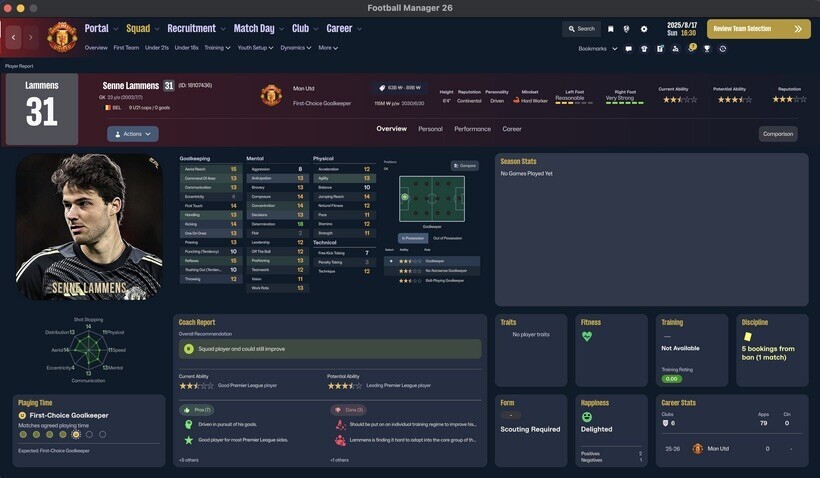
Manager Photo Replacement: Change your manager's profile picture without any extra software, just like player or staff facepacks.
Simply find your Manager ID and place the desired photo in your graphics folder using that ID.
(Tip: Search for "facepack installation guides" for detailed instructions.)
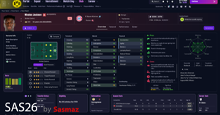
Opponent Tactics Preview: View the opposing team's tactics in advance.
Enhanced Profile Photos: Larger, better-scaled images for both player and staff profiles.
Visual Improvements: Various UI/UX enhancements for better gameplay convenience.
[IMPORTANT] The "Numerical Attributes" feature (displaying player/staff attributes as numbers) is excluded from this free version.
Compatibility & Installation
Both Mac and Windows versions are provided. Please download the version compatible with your OS.
How to Install (Mac Version)
Download the Mac version.
Copy the 17 files located inside the free folder.
Paste them into the directory below and replace the existing files. [IMPORTANT: A backup of your original files is mandatory before replacing.]
/Users/(YourName)/Library/Application Support/Steam/steamapps/common/Football Manager 26/fm.app/Contents/Resources/Data/StreamingAssets/aa/StandaloneOSX/
How to Install (Windows Version)
Unzip the downloaded file and locate the free skin folder.
Copy only the files inside that folder (do not copy the folder itself).
Paste them into the following directory: [IMPORTANT: A backup of your original files is mandatory before replacing.]
\Football Manager 26\fm_Data\StreamingAssets\aa\StandaloneWindows64
For more information regarding our paid and membership skins, please check the link below: https://www.patreon.com/skogr/posts/skogr-skin-has-161889818



![FM26 Data Tweaks [v3.6 | v5.3]](https://fmdatatweaks.com/wp-content/uploads/fmdt-cover.webp)


Discussion: skogr skin free (win + macOS)
36 comments have been posted so far.
I haven't used any mods other than the skin. The issue doesn't happen every time, I can play five (+) matches without any problems, and then it might happen every match after that.
It usually stops after I restart the game, but I often leave the game running in the background for days, so that could be contributing to the issue.
It looks like no one else is experiencing the same problem, so it could be something on my end.
"I was wondering if you are using my skin on a vanilla installation (without any other mods). I just tested it myself, and the window closes perfectly without any flickering issues. Could you please try testing it on a vanilla setup? This will help me identify whether the issue is related to other mods or something else."
the other thing is that the substitutes list of players in both tactical view are flashing.
thanks
"I just checked, and everything seems to be working correctly on my end. It might be an issue with the face file size or the config.xml file. Could you please double-check those settings?"
"You can change the coach's profile photo to any image you want by checking their ID and replacing the face, just as you do with players."
여튼 베낀게 있으면 어떤건지 적어봐 내가 수긍되는거면 수긍하면되는거지 뭐 내가 공개한 내용들처럼 공개됨으로서 다 쓸수있는부분이라면 큰문제없는거 아닌가? 나머지는 사용자의 선택인거지 여튼 계속 수고하고 욕을 더하던 말던 상관없어 어짜피 너는 패트리온 한달동안 가입되어있으니 내가 업데이트하는걸 다운받을 수 있을거야 스코어보드가 완벽하진않지만 어느정도 배치는 맞춰지고있으니 너의 유료멤버십이 끝나기 전에받을 수 있을거야 수고해
다른 제작자 가격이 어떤지 모르니까 그부분은 비싼지 안비싼지 모르겠고
가격적으로 마음에 들지않으면 구매안하면되는거임, 멤버십을 가입한다고 모든 다운로드를 제공한다고 한적도없으며 제대로 몰라서 구매했다면 이런이런사정으로 잘못구매한거 같다고 말했다면 쉽게해결될 일을 욕부터 박고 말하면 대화가 되겠니? 여튼 다운로드를 제공한부분이니 환불을 거부한거고 니가 원하는건 내가 욕먹길 바라는 거니까 계속 욕해 상관없으니까 그리고 스킨제작에서 어떤부분을 베낀건지 알려주고 말하는게 좋지않겠어?
I will apply this in the next update.