


Are you struggling with "Jaded" players and endless injuries while playing Gegenpress or High-Intensity tactics? This training pack is the solution.
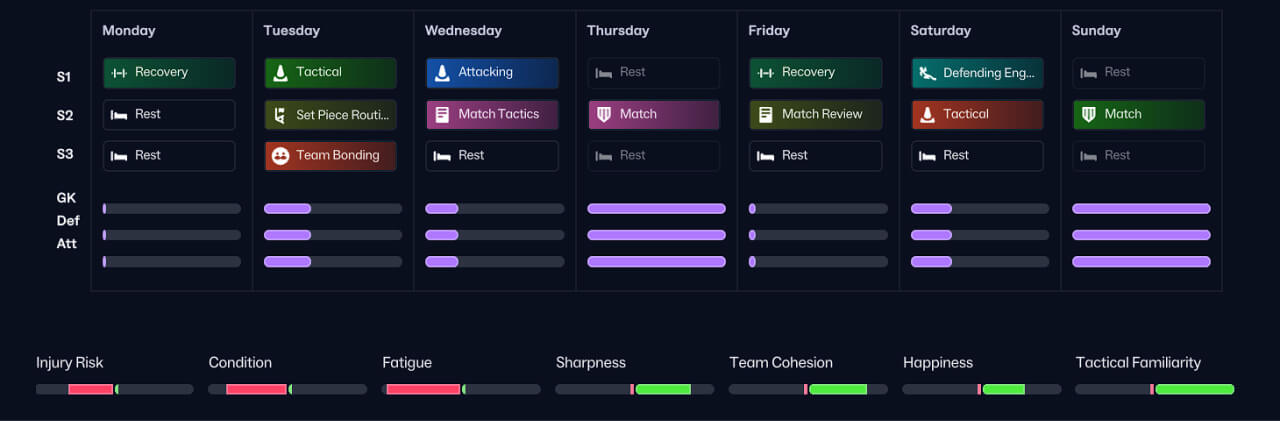
SNA: Gegenpress Training Schedules is designed to balance high physical development with necessary recovery. It avoids the "overtraining" trap by utilizing Match Preparation boosts instead of heavy physical sessions during congested fixture lists.
📦 WHAT'S INCLUDED
The schedules are logically numbered for easy sorting:
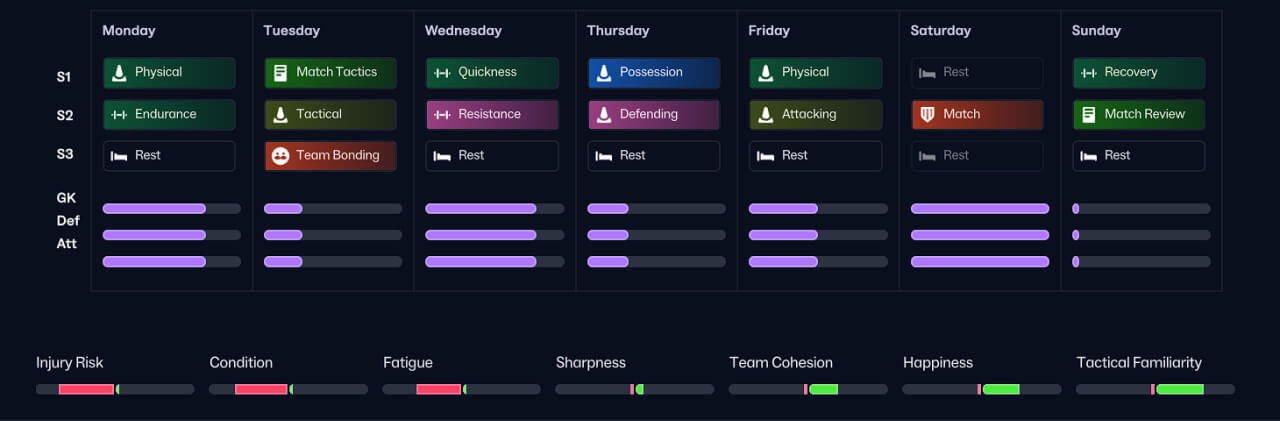
📂 00 Pre-Season: Heavy physical load to build stamina and tactical familiarity before the league starts.
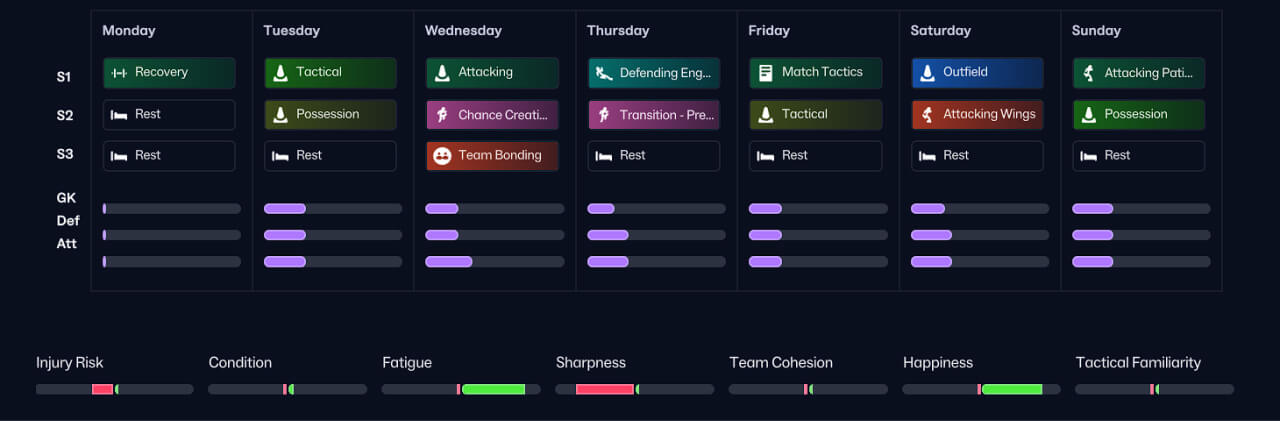
📂 01 No Match: Perfect for International Breaks to develop fringe players and keep fitness levels high.
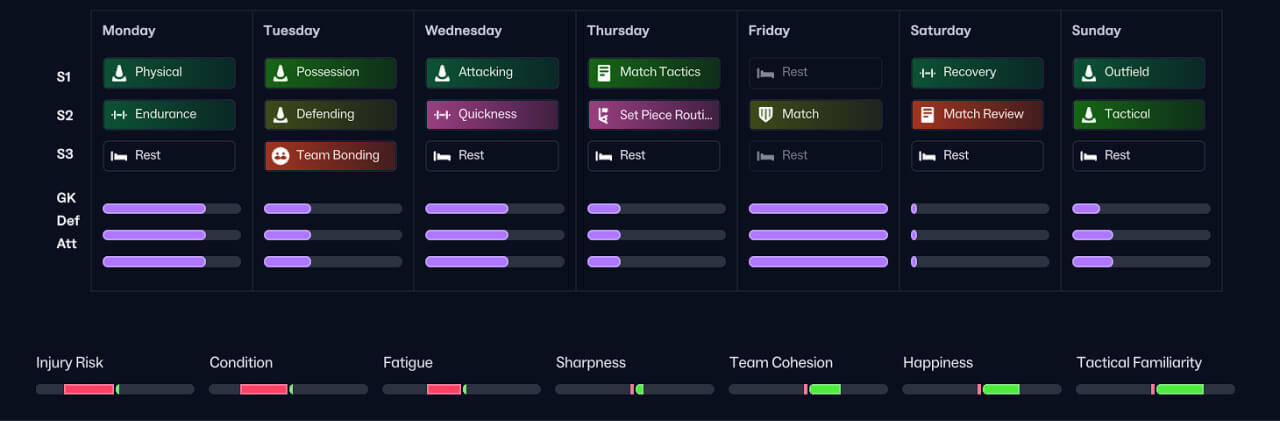
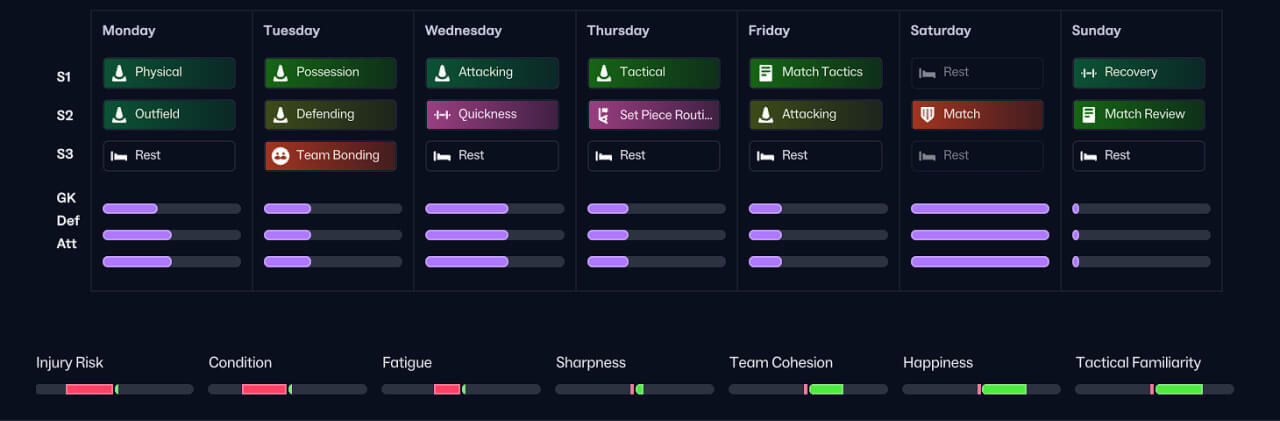
📂 10-Series (1 Match/Week): Balanced development for weeks with games on Wed, Friday, Saturday, or Sunday.
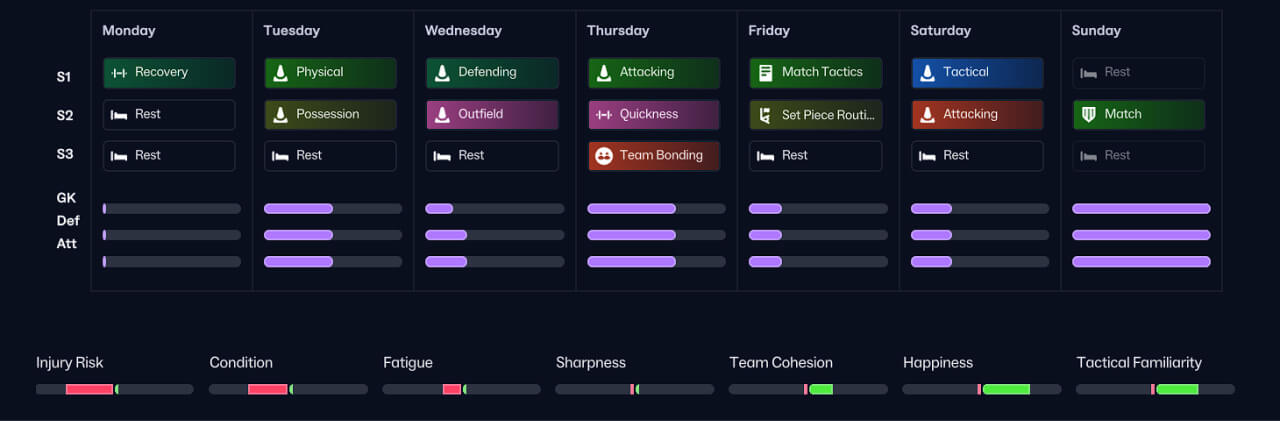
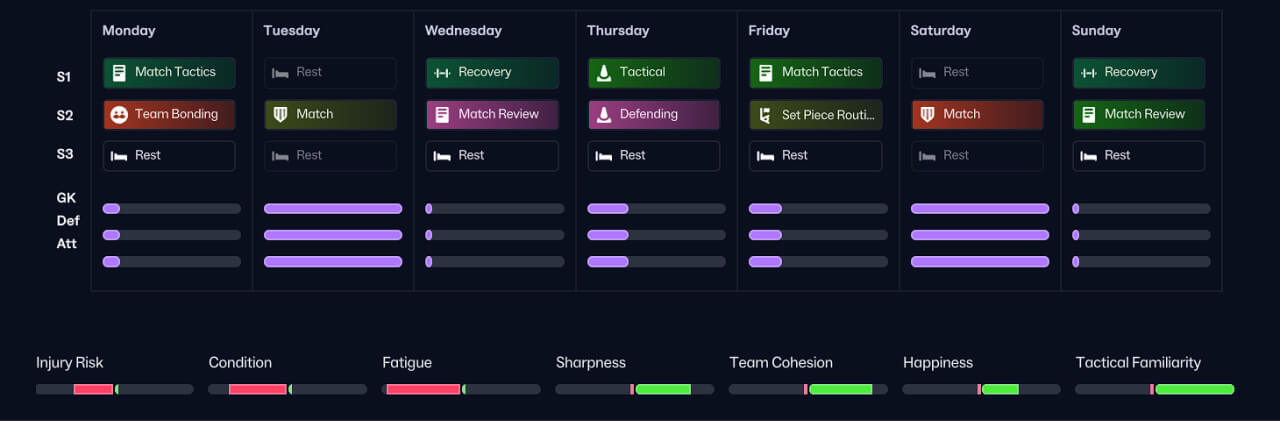
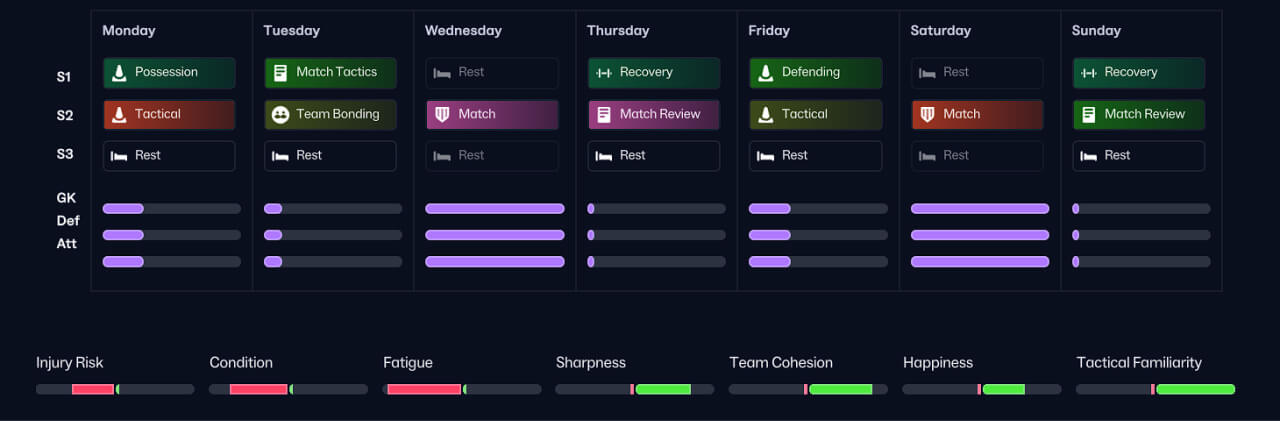
📂 20-Series (2 Matches/Week): "Survival Mode" for European nights. Focuses purely on recovery, tactical shape, and keeping players fresh. (Tue+Sat, Wed+Sat, Wed+Sun, Thu+Sun).
⚠️ IMPORTANT: HOW TO USE (PLEASE READ)
1. The "Sunday Match" Rule FM schedules run from Monday to Sunday. If you use the 12 Sun - Match Day or 22 Thu+Sun schedules, the recovery and analysis for that Sunday game must happen on the following Monday.
Action: When a new week starts after a Sunday game, please manually ensure that Monday Slot 2 is set to "Match Review" and Slot 1 is "Recovery".
2. Match Preparation Boosts These schedules heavily utilize "Attacking" and "Defending" before games. These sessions provide a temporary boost to attributes like Off The Ball and Positioning for the upcoming match without draining condition.
3. Recommended Rest Settings To make this system work perfectly, go to Squad ->Training -> Training Intensity and set:
Condition: Fair -> Set to "Half Intensity"
Condition: Poor (Left side) -> Set to "No Pitch or Gym Work"
This ensures that players who played 90 minutes automatically skip the heavy sessions, while your bench players get the full benefit of the training.
4. Pro Tip
💡 The "Rest vs. Recovery" Myth You might notice these schedules use Rest sessions more often than Recovery. This is intentional. A common mistake is spamming Recovery sessions thinking it heals players faster.
Recovery: Keeps players at the training ground for light work. This is vital immediately after a match to prevent injury risk, but it does not clear deep fatigue effectively.
Rest: Sends players home. For high-intensity tactics, this is the only way to significantly reduce the "Fatigue" meter and restore Condition back to 100%.
The SNA Logic: I use Recovery strictly post-match. I use Rest during the week to ensure players have the energy to sprint for 90 minutes.
Pre-Season:
No Match:
Wed
Fri:
Sat:
Sun:
Tue+Sat:
Wed+Sat:
Wed+Sun
Thu+Sun:
🛠️ INSTALLATION & USAGE GUIDE
Step 1: Place the Files Move the downloaded .fmf files into the following folder on your computer:
Windows: Documents \ Sports Interactive \ Football Manager 26 \ schedules
Mac: Users \ [Your Name] \ Library \ Application Support \ Sports Interactive \ Football Manager 26 \ schedules (Note: If the "schedules" folder doesn't exist, create it manually).
Step 2: Load Schedules into the Game
Go to the Squad > Training section.
Click on the bar/title of the Training Style, select "Create New Schedule" (bottom left).
In the pop-up window, click the "Dropdown" (top left), choose Custom Schedules and then click "Load".
Select the SNA schedules from the list and click Load. (Tip: If they don't appear immediately, try clicking "Create New Schedule" to refresh the list or restart the game).
Step 3: Apply to Your Calendar
Now you need to assign the correct schedule for each week based on your matches.
Go to Squad > Training.
Look at your fixtures for the upcoming week (e.g., a match on Saturday).
Click on the bar/title of the Training Style at the left side of that week (where it usually says "Style of the Training").
Click on the empty dropdown menu (top left), select Custom Schedules > Select the correct schedule (e.g., 11 SNA Sat).
Repeat for all weeks.


![FM26 Data Tweaks [v3.6 | v5.1]](https://fmdatatweaks.com/wp-content/uploads/fmdt-cover.webp)





Discussion: Gegenpress Training Schedules for FM26
18 comments have been posted so far.
Would it be possible to add a Tuesday and Friday matches to the training schedule
I added a Wednesday based training schedule. The original plan is built around a Friday match, so I shifted the same training logic to fit a Wednesday game (prep on Tuesday, recovery and review on Thursday). I also added a full Wed+Sun schedule for weeks with two matches.
This setting works like a simple IF rule system based on Condition hearts. Left side (3 hearts) is low condition, so I set all 3 to No pitch or gym work, meaning tired players automatically skip all normal training load. Right side (2 hearts) is better condition: upper right is Half Intensity for slightly tired players, and bottom right is Normal Intensity for fresh players.
In short: exhausted players rest, borderline players train light, fit players train normal.
Condition: Fair -> Set to "Half Intensity"
Condition: Poor (Left side) -> Set to "No Pitch or Gym Work"
Is it to all 3 hearts on the left I select No pitch or gym work and then half intensity to both hearts on the right? Or is it something different? Thank you
Choose the schedule you loaded and then click Save Schedule.
There is nothing custom inside them, just the standard Export function, so the schedule should never turn into a full “Rest” week unless the game fails to read the sessions.
A workaround in case you cant fix them would be literally making them in fm24 and link them back here (unless you already did so). Cheers
Note: If the "schedules" folder doesn't exist, create it manually.
Steam Library → Right-click Football Manager 26 → Properties → Betas → Select “public_beta”.
Steam will download the beta build automatically.
To return to the full release, switch the dropdown back to “None”.
To load a custom training schedule inside FM26:
Go to Calendar.
Open Training Schedule.
Select Create New Schedule.
At the top-left, open the dropdown menu.
Choose Custom Schedules.
Select Load and pick the schedule file you imported.
After loading, the weekly plan will populate with all sessions from that schedule, and you can apply it to the week or save it under a new name.
Both full release and public beta support loading custom schedules this way.
What exactly happens on your end? Does the game replace every session with Rest when you load the schedule, or do the individual drills simply not appear at all?