



I would like to share with you my newgen replacement pack. The pack currently consists of:
200,000 male player pictures across 60 different ethnicity categories
45,000 female player pictures across 32 different ethnicity categories. Got major update with Womens Football 3 pack from June.
18,000 staff pictures for both male and female.
You can have a preview of my pictures and (almost all) ethnicity categories here:
MALE PICTURE SHOWCASE
FEMALE PICTURE SHOWCASE
For FM26, you can get the pack in two versions:
a) Single Bundle File (NG_Regens Lite Experience)
This is a single bundle file that you can place in your FM26 folder. It's easy to install and use, but it's significantly limited in what it can do, how many faces it includes, and what methods are used to assign faces to newgens.
b) Full Experience with Custom Software
I recommend the full experience with my custom software. It supports more than 15 times the number of pictures, categories, and assignment methods.
FULL VERSION for Mac and LINUX/SteamDeck(FM26, FM24 and FM23)
I have a completely new version for you that reads information directly from Savefiles and requires no SIP deactivation and no sudo. It is in early testing stage, but I still think it is better for you to go directly that way now as the experience is THAT much better. Another major difference: You do not need to have the game running in the background. You still can, but it is no longer required.
Follow the guide here:
FM26/FM24/FM23 MAC/STEAMDECK/LINUX GUIDE
FULL VERSION FOR WINDOWS(FM26, FM24 and FM23)
On Windows at this point in time you actually have a choice between two different versions. The one that reads information directly from a running FM instance and the new one that reads all information from a savefile. As of April I think it safe to switch my recomendation. I now recommend you start with the Savereader method. Only if for some reason it doesnt work for you should fallback to the memory reader. For FM23 you have to go the savefile reader method.
Try this first: FM26/FM24/FM23 WINDOWS SAVEFILE READER METHOD GUIDE
If you have problems, try this instead: FM26/FM24 WINDOWS MEMORY READER METHOD GUIDE
If you can open the page from your phone, but not from your pc, then it is your Windows Antivirus/WebFilter - You can try to whitelist *.ngregens.org somewhere in its settings. As another workaround you can try to set your Windows DNS Settings to use Google DNS 8.8.8.8 or Cloudflare DNS 1.1.1.1. You can find (not mine) guide on how to do that on your Windows machine here
THE BUNDLE REPLACEMENT METHOD:
If you're on Windows, I strongly recommend using the full experience of the pack with my custom software. However, if your platform isn't supported yet or you don't want to deal with the software I've created, I have a bundle file for you to use with the bundle replacement method. Just keep in mind that this bundle represents only about 5-10% of the full experience (it's not me limiting you to force software adoption - this is simply how the bundle method works).
1. Download the updated bundle file from here: https://download.ngregens.org/ui-newgen-portraits_assets_all.bundle
2. Go to your FM26 install directory. By default, it should be \Steam\steamapps\common\Football Manager 26\fm_Data\StreamingAssets\aa\StandaloneWindows64\
3. Make a backup of the ui-newgen-portraits_assets_all.bundle file in case you want to revert to default faces.
4. Copy the file you downloaded in step 1 into the FM26 folder, replacing the original file.
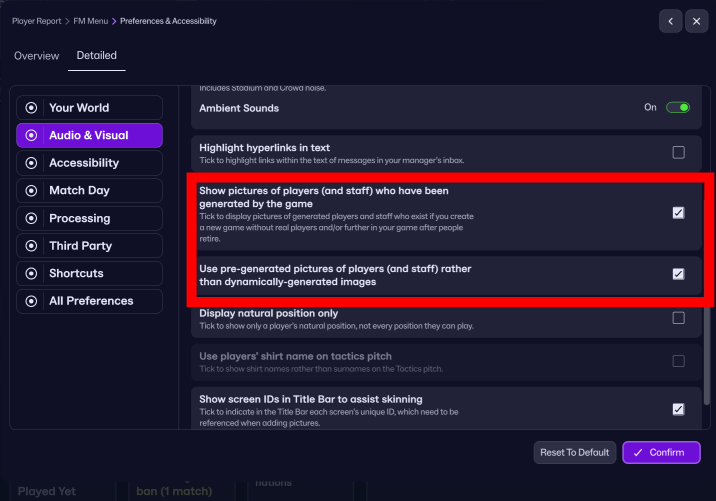
5. Start FM26, go to the Preferences screen, and select "Detailed" in the top menu. Then select "Audio & Visual" in the left menu and check the "Use pre-generated pictures of players (and staff) rather than dynamically-generated images" option (as shown in the screenshot).
6. Restart the game.
To revert (or migrate to my full-featured experience with the custom software), uncheck the "Use pre-generated pictures of players (and staff) rather than dynamically-generated images" option and copy the original bundle (that you backed up in step 3) back into the FM26 directory.
If you are interested in FM24 version with shortlist export method for both Windows and Mac you can still download and use the old 25 version of the software below.
This is project costs me 100-200e monthly to develop and support, so your donations are greatly appreciated!
Stay tuned!
///////////////////////
BELOW IS THE OLD SHORTLIST EXPORT METHOD FOR FM23 AND BELOW FOR ALL PLATFORMS:
Due to how diverse the pack is, I had to create my own expanded folder system to accomodate all 55 categories, so the pack requires a custom NG_Regens Manager 25 software
Installation guide:
1 - Get the main NG_Regens facepack here
2 - Copy the NG_Regens folder into your FM Graphics folder. It would be the same folder where you have put the original newgan facepack or where you put real facepacks. In my case that would be “Documents\Sports Interactive\Football Manager 2024\graphics\faces\”
3. Download the NG_Regens Manager 25: Mac
4. Watch the NG_Regens Manager 25 guide on Youtube
If you need a detailed video guide on shortlist export process you can find it here
Deepdive into new version 1.2 features
I will redo all three current Youtube videos into one, but this is a time consuming process, so bear with me.
F.A.Q.
Q: Why did you create a new folder structure? / How can I unpack your pack into the old NewGAN "Italmed/YugoGreek..." folders?
A:
First off, huge shoutout to the original NewGAN team—they did an amazing job, and their work is still being used by thousands of people today. Even my project builds on the filters and views they created, so big respect to them. Seriously, none of this would be possible without their foundation.
That said, the original NewGAN pack came out about five years ago, and it was built using the tools and structure available at the time. It only has 14 categories for the entire world. A lot of care went into the big football nations, but unfortunately, many other countries kind of got lumped together in ways that don’t really make sense.
Let’s do a little experiment: I could show you a few images from my pack, each from a different category. In the old NewGAN setup, all of those would’ve ended up in the same group—meaning a player from one of those countries could randomly get any of those faces.

Notice the difference? That’s why it’s just not possible to repackage my set back into the old structure without losing all the nuance (or simply creating a mess).


![FM26 Data Tweaks [v3.6 | v5.0]](https://fmdatatweaks.com/wp-content/uploads/fmdt-cover.webp)




Discussion: NG_Regens Newgen Megapack with Women's Football Pack 3 - FM26, FM24 and below
426 comments have been posted so far.
Would you consider providing an official macOS .ICNS icon for NG Regens Manager 25? It’d be great for those of us using the app on macOS to have a native-looking icon.
Thanks for considering it, and appreciate all the work you’ve put into the project!
There is a bug (or feature?) in FM that reallocates and recycles regen UIDs, which is particularly annoying as regens after a couple of years are often left with faces that do not match their profile.
This has been documented here, and probably explains it better than I can: https://fullerfm.com/2024/12/19/fm24-the-regen-bug/
I have tried to come up with a fix to this bug, which is admittedly imperfect but gets the job done to some degree. Sorry if it's hard to follow, but the 'fix' boils down to:
- Search all 15-16 year old newgens in FM and save them as txt file.
- Use the 'overwrite' feature on the config using this txt file.
(I have been using the 'overwrite' function in your original newgan manager, which doesn't appear to be a thing in the newer version).
- This step would keep previously generated faces (of players aged 17+) and gives 15/16 year olds new faces which match their ethnicity.
(If you wanted to keep faces for certain players below 17 years of age, you can look up their faces beforehand and keep a note so they can be manually reverted once overwritten)
- Then run a 'preserve' with ALL regens (as normal) to allocate faces to those who have been missed.
Doing all this twice per season (1st Nov, mid April) catches players before they age out of the 15-16 bracket and may be stuck with a face which does not match their heritage.
If there was a way to incorporate a feature in the NG manager which associates IDs with names and remembers, I believe the regen bug could be remedied.
When preserving, regen IDs which have a new player's name attached to them could have their faces overwritten so that they aren't left with an ill-fitting face.
Apologies if this has been done so already, as said before I have been running an outdated version of the Regen manager. If this isn't possible to implement, could I ask that the 'overwrite' feature be restored to the new NG Regen Manager?
I just wanted to finish by thanking you for reigniting my interest in FM. Your project is fantastic and has really strengthened the immersion of the game for me!
My plan's to set up one permanent link for the main pack, something like ngregens.org/NG_Regens_MainPack.zip, and just swap out the contents each time there's a new release. Software links are gonna stay the same too. That way people can just share those 3 links in their communities without worrying about them going dead.
That'd bring the whole pack down to about 2.5GB and the picture packs to around 500-700MB - that's massive savings, eh! Means I can chuck everything on Cloudflare, which is a proper win-win for everyone.
I used the command line (macOS) terminal, and ran command to go through every .png file in the folder (and subfolders) and compress them:
find . -type f -iname "*.png" -exec pngquant --strip --force --ext .png {} +
find . -type f -iname "*.png" -exec oxipng --strip all {} +
pngquant compresses the PNGs by reducing the number of colours and oxipng is a lossless PNG optimiser that squeezes out more bytes by cleaning metadata (like creation date, colour profiles, etc.), which isn’t needed for in-game use.
I'm honestly getting a bit tired of that link management as a whole. I'm thinking about taking the bullet and just paying for Cloudflare storage. I already have migrated the installation files and PP3 there—maybe I should just migrate everything there. And since it's Cloudflare, I won't even need to do mirrors anymore.
Totally understand if it’s not a priority, but thought it was worth mentioning. Thanks again for everything you do!
It's strange that it didn't update your config.xml to replace the old Turkish pictures with the new ones though... hmm, I'll investigate that. Cheers for letting me know!
Main reason I noticed is because after the newest Picture Pack there's been quite a few newgens which didn't actually get converted to the newer faces and were left with the old ones in config and in-game were left with blank faces, mainly found it was the Turkish ones for whatever reason. Upon looking for said newgens I then started finding duplicates hence my question.
I've combined quite a few packs alongside yours and am sitting at around 420k faces with alot of the packs being quite populated, I double checked to see if any of the packs had already hit their limits cross-referencing with the config but none did. I also am currently in the 2040s as I always do very long saves in FM.
Thanks for the clarification and will look forward to the next update, quality faces being put out here.
I'll start by saying that there's currently a bug in how pictures are being selected that affects "Preserve" mode under some conditions and can cause excessive overuse of the same set of images. That "bug" (let's call it that—actually, it's more like a flaw in logic) has always been there, including in any version of NewGAN/FM.Z, so it's not new.
I'll release an updated version of the software together with the next Picture Pack that should reduce the overuse dramatically, to the point that it shouldn't be noticeable unless you are either: a) way into the future, b) playing in a nation that has a really small pack attached (which basically means a custom DB in Mongolia or Somalia or similar), c) playing on a custom DB that adds a crazy amount of newgens right from the start (English T20 DB or something like that), or d) have really, REALLY bad luck.
The old "allow duplicates" option is on by default here, and you can't currently change that as it tends to: a) confuse people about what that exactly does, and b) make people scared of seeing duplicates and turn it off, even though they've loaded EPL only on a 6,000-picture English pack.
Also, don't forget that "seeing duplicates in config," "seeing duplicates in-game," and "actually realizing that you've seen duplicates" are three completely different things, where only the third one affects your game experience. For the vast majority of people on default leagues, it would take double-digit seasons until it happens (unless they've encountered the bug from above or had really bad luck).
If there's a strong feeling that it should be brought back, I can probably implement the option somewhere on the settings screen.
I've noticed the generator does not prevent duplicates? In my config file I am noticing duplicates which I assume should not be happening unless such option hasn't been implemented.
Im currently working on expanding the Americas, there is a possibility I will be able to create distinct enough packs for caucasian USA/Canada, afroamericans and Paraguay/Argentina Guaraní mestizos. Im also working on upgrading the original Mestizo and Afrocaribbean folders + Portugal.
If there will be completly new folders, then the next upgrade will become "must to install" as I would need to push a new config settings to the app and it will stop working without those new folders... still in search of the best/easiest solution here
I distribute them via the software, not because I want to be difficult, but because it's incredibly time-consuming for me to manage links otherwise. I would need to distribute them to 4 places instead of 1, maintain them in 4 different locations if a link changes, and if I make a typo, it would be harder to track down... This might seem unimportant now with only two picture packs, but imagine how it would look when we get to 10 or 20...
Also, as summer is approaching, I won't be able to generate as much content (or I'd die from overheating), so my idea was to reduce the size of picture packs and distribute them more frequently but with less content per pack. In that case, I would only update the big pack once every 20,000 pictures or so. If I had to update 4 pages every time I release a small pack, I'd probably just stop doing this altogether
Also worth noting: the Reddit page now gets auto-deleted by filters every time I update it, and I need to ask mods to undo that... so yeah
Great work, hope you continue it for a long time.