Search
On FM Scout you can chat about Football Manager in real time since 2011. Here are 10 reasons to join!

NG_Regens Newgen Megapack with Women's Football Pack 2 - FM26, FM24 and below

A newgen megapack with around 195 000 pictures including a Women's Football Pack (WIP) and a Staff Pack with support for FM26 (bundle or with management software), FM24 and below.

By Updated on Jan 13, 2026   377 comments
Download Now
Size: 3.1 GB / Added: 2025-05-25
Football Manager 2026 Facepacks - NG_Regens Newgen Megapack with Women's Football Pack 2 - FM26, FM24 and below
Hello guys!

I would like to share with you my newgen replacement pack. The pack currently consists of:

160,000 male player pictures across 60 different ethnicity categories
18000 female player pictures - this base pack is still under development, not every nation/ethnicity is covered yet.
18000 staff pictures for both male and female.

You can have a preview of my pictures and (almost all) ethnicity categories here:
MALE PICTURE SHOWCASE
FEMALE PICTURE SHOWCASE

For FM26, you can get the pack in two versions:

a) Single Bundle File (NG_Regens Lite Experience)
This is a single bundle file that you can place in your FM26 folder. It's easy to install and use, but it's significantly limited in what it can do, how many faces it includes, and what methods are used to assign faces to newgens.

b) Full Experience with Custom Software
For Windows (FM26 and FM24) and Mac (FM26 or FM24 with the old shortlist method on the old 25 verison of the software) users I recommend the full experience with my custom software. It supports more than 10 times the number of pictures, categories, and assignment methods. For FM26 I'm currently investigating how to port this to Steam Deck.

THE FULL VERSION FOR WINDOWS(FM26 AND FM24) and macOS (FM26 only + FM24 via shortlists):

Follow the guide here:
FM26/FM24 WINDOWS GUIDE
or
FM26 MAC EARLY BETA GUIDE - Mac version is in VERY early beta stage, so errors are more than possible. Please report your issues in the comment section and I will get back to you. You can also use it for FM24 with shortlists export method.

LINUX/SteamDeck

I have prepared a Linux/StemDeck build, I have very limited gaming Linux experience and I dont own a SteamDeck so yeah, ideal combination 😄 I built and tested on CachyOS using Steam/Proton, so thats what it expects - this setup is the closest to a SteamDeck that I could get - (almost sure it wont work with Epic because of different folder structure). It doesnt require root to run the the GUI part (so you can probably theoretically make it run with FM24 shortlists, albeit I havent tested it), but it does require root for the scanner subprocess (there is probably another way via tinkering with /proc/sys/kernel/yama/ptrace_scope but Im not sure what is more/less invasive). The rest is identical to Windows guide.
https://download.ngregens.org/ng_regens_manager26-1.0.0-x86_64.AppImage

If you can open the page from your phone, but not from your pc, then it is your Windows Antivirus/WebFilter - You can try to whitelist *.ngregens.org somewhere in its settings. As another workaround you can try to set your Windows DNS Settings to use Google DNS 8.8.8.8 or Cloudflare DNS 1.1.1.1. You can find (not mine) guide on how to do that on your Windows machine here


THE BUNDLE REPLACEMENT METHOD:

If you're on Windows, I strongly recommend using the full experience of the pack with my custom software. However, if your platform isn't supported yet or you don't want to deal with the software I've created, I have a bundle file for you to use with the bundle replacement method. Just keep in mind that this bundle represents only about 5-10% of the full experience (it's not me limiting you to force software adoption - this is simply how the bundle method works).

1. Download the updated bundle file from here: https://download.ngregens.org/ui-newgen-portraits_assets_all.bundle
2. Go to your FM26 install directory. By default, it should be \Steam\steamapps\common\Football Manager 26\fm_Data\StreamingAssets\aa\StandaloneWindows64\
3. Make a backup of the ui-newgen-portraits_assets_all.bundle file in case you want to revert to default faces.
4. Copy the file you downloaded in step 1 into the FM26 folder, replacing the original file.
5. Start FM26, go to the Preferences screen, and select "Detailed" in the top menu. Then select "Audio & Visual" in the left menu and check the "Use pre-generated pictures of players (and staff) rather than dynamically-generated images" option (as shown in the screenshot).
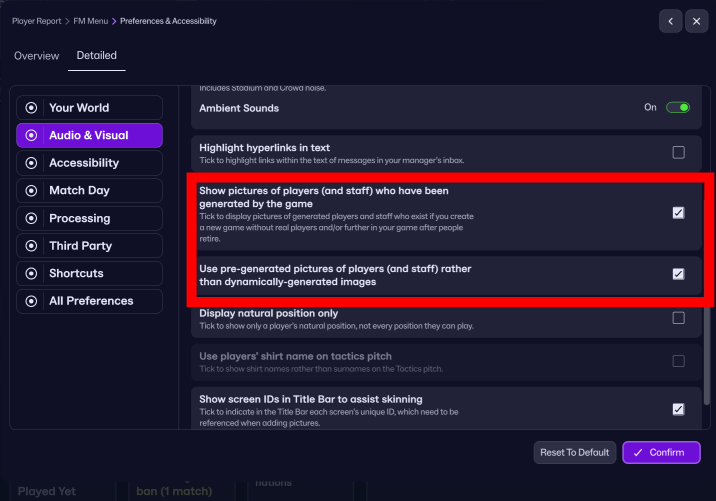


6. Restart the game.

To revert (or migrate to my full-featured experience with the custom software), uncheck the "Use pre-generated pictures of players (and staff) rather than dynamically-generated images" option and copy the original bundle (that you backed up in step 3) back into the FM26 directory.


If you are interested in FM24 version with shortlist export method for both Windows and Mac you can still download and use the old 25 version of the software below.

This is project costs me 100-200e monthly to develop and support, so your donations are greatly appreciated!

Stay tuned!


///////////////////////

BELOW IS THE OLD SHORTLIST EXPORT METHOD FOR FM24 AND BELOW FOR ALL PLATFORMS:


Due to how diverse the pack is, I had to create my own expanded folder system to accomodate all 55 categories, so the pack requires a custom NG_Regens Manager 25 software

Installation guide:

1 - Get the main NG_Regens facepack here

2 - Copy the NG_Regens folder into your FM Graphics folder. It would be the same folder where you have put the original newgan facepack or where you put real facepacks. In my case that would be “Documents\Sports Interactive\Football Manager 2024\graphics\faces\”

3. Download the NG_Regens Manager 25: Mac

4. Watch the NG_Regens Manager 25 guide on Youtube
If you need a detailed video guide on shortlist export process you can find it here
Deepdive into new version 1.2 features
I will redo all three current Youtube videos into one, but this is a time consuming process, so bear with me.


If you’ve already got a save going and want to keep your existing regen faces but generate new ones using my latest pack—you’re all good, I’ve got you covered! The program can read both the classic NewGAN format (Zealand’s original one) and the newer FM.Z/URAN format. If anyone’s using a different format, definitely let me know so I can look into it.

Just a heads-up though—this compatibility is one-way:
You can use your old mappings with this tool, but you won’t be able to go back and use classic NewGAN/FM.Z/FMRTE afterwards (or at least, I honestly have no idea what would happen).

So here’s what to do:
Find your current regen pictures folder — this is the folder you've been using as your image folder in NewGAN Manager, FM.Z Manager, or FMRTE.

Copy the contents of the NG_Regens folder from the archive you downloaded in Step 1 of the guide and paste it right into that same image folder.

If you’re using the classic NewGAN format, your folders should now look something like this, with old and new folders side by side at the same level:


There’s just one small caveat: the folder called "Scandinavian" exists in both the old and new packs. But don’t worry—our files have different names, so they won’t overwrite each other.

Here’s what will happen with that specific folder:
Your old face assignments will stay intact—no worries there. The system will treat the "Scandinavian" pics from both packs as part of the same group. That means you might see old faces showing up on new players and if you start a new save and click "Generate", the program will pull from both versions. You’ll basically end up with a Scandinavian mega-pack of around 12,000 pics.

If you’re using the FM.Z/URAN format, your folder structure should look like this:


Just keep them at the same level in the directory and you’re all set!


If you have any questions regarding the installation or anything else, you can leave a comment here, on my youtube channel or you can send me an email to [email protected]

I hope you have fun with the pack and have a very nice day!


F.A.Q.

Q: Why did you create a new folder structure? / How can I unpack your pack into the old NewGAN "Italmed/YugoGreek..." folders?

A:
First off, huge shoutout to the original NewGAN team—they did an amazing job, and their work is still being used by thousands of people today. Even my project builds on the filters and views they created, so big respect to them. Seriously, none of this would be possible without their foundation.

That said, the original NewGAN pack came out about five years ago, and it was built using the tools and structure available at the time. It only has 14 categories for the entire world. A lot of care went into the big football nations, but unfortunately, many other countries kind of got lumped together in ways that don’t really make sense.

Let’s do a little experiment: I could show you a few images from my pack, each from a different category. In the old NewGAN setup, all of those would’ve ended up in the same group—meaning a player from one of those countries could randomly get any of those faces.


Notice the difference? That’s why it’s just not possible to repackage my set back into the old structure without losing all the nuance (or simply creating a mess).


That said, you can totally keep using your existing save where players already have NewGAN faces assigned, and just use my pack for generating new faces. I’ve got a guide on Reddit that walks you through it—look for the section called "Keeping your current regens."

Download Now
Downloads: 56915 / Size: 3.1 GB / Added: 2025-05-25
Your content on FM Scout

We are always looking for quality content creators, capable of producing insightful articles. Being published here means more exposure and recognition for you.

Do YOU have what it takes?

Discussion: NG_Regens Newgen Megapack with Women's Football Pack 2 - FM26, FM24 and below

377 comments have been posted so far.

  • bosnakserseri's avatar
    Amazing work well done lads
  • bozo123456789's avatar
    help, i cant scroll down in setting menu so i cant confirm/save new changes
  • Qlimackz's avatar
    all pictures of my 1 yrs old newgens have been overwritten although I took preserve mode...
  • Dax's avatar
    Just a feedback if I can, doesn't take away anything from the massive work done. There's way, way, waay too many blonde women in the female pack for Japan (haven't checked other asian countries). I've fixed it by removing a lot of those myself but obviously it also means less faces. It's just a tad unrealistic...
  • ElGusto's avatar
    Hi, when i run the scan, generate and restart the game all newgens have new faces, but when i restart my pc every face is back to standart FM newgen faces. Any idear whats wrong? Thank you
  • fez_24's avatar
    Yeah, I'm using an Intel Mac. I think that might be the issue, is there any way to make the app support intel?
  • cprrylow's avatar
    Hi, what architecture do you have - Intel or Silicon? I think I have built it on Silicon, so maybe it is somehow restricted on that... not sure tbh
    1
  • fez_24's avatar
    Hi I'm having issues on mac when it comes to performing the scan the app runs, but when i try to scan players i get the error.
    ‘Bad CPU type in executable’.
  • SoA_McClure's avatar
    tell a lie. Just firewall was blocking it. All good.
  • SoA_McClure's avatar
    Main pack link seems to be down. Is there somewhere else I can get this?
  • cprrylow's avatar
    I have figured out how to assign faces to press/agents on FM26. You can grab an updated test scanner file in Discord in my channel if you want.

    I will wait for SI to release the next patch and will release the proper 1.0 update after that, sometime towards the end of next week.
    1
  • cprrylow's avatar
    @dp8825 please ping me on Discord, the invite is in the software in the bottom left.

    @eltel23 This is ID Recycling. You can find more about what it is in the installation guide at the absolute bottom of the page. To fix that - save your game, go to main menu, load back, do a scan in preserve mode, reload fm24 skin/restart fm26
    1
  • eltel23's avatar
    Hi pack is great however some of my male newgens are getting female faces. is there any fix to this?
  • dp8825's avatar
    Followed all the steps but not getting any photos whatsoever for regens, just a black square
  • dpendao's avatar
    I don't understand, I follow all the steps and only some have faces... what's going on? The missing players are in .xml files but their faces don't appear.[img]https://imgur.com/a/vIl1ss0[/img]
  • cprrylow's avatar
    @MR11 you create another Savegame Profile for this new savegame and do exactly the same process. You can watch my youtube video guide starting from around 4:00

    www.you tube. com/watch?v=oRm0GYOKoyc
  • cprrylow's avatar
    @MR11 You create another Savegame Profile on the Generate page for that save and do the same scan process again.

    You can watch my youtube video guide starting from around 4:00
    https://www.youtube.com/watch?v=oRm0GYOKoyc
  • Rapid Gamer's avatar
    super
    1
  • MR11's avatar
    if i want to load the pack in a different save i just load the different save ?
  • mariuszxmaras's avatar
    I downloaded the new zip files and everything is fine. Thanks for the help and sorry for the trouble.
    1
  • cprrylow's avatar
    I have just found an error on my side, I have fatfigered wrong file names in the zip archive(P11Israel and P11Turkish instead of PP11Israel/PP11Turkish). It shouldnt matter if you install via the software, but will mark the pack as invalid if you manually copy them.

    I have already uploaded a new corrected file, you can redownload it if you want. Or you can simply mass rename files by yourself:

    PP11Israel0001.png
    through to
    PP11Israel1954.png

    and

    PP11Turkish2451.png
    through to
    PP11Turkish3783.png

    In any case this is only a cosmetic error in the pack installer to mark a pack as installed or not - the files will be used for picture assignment anyway
    1
  • mariuszxmaras's avatar
    I did as you advised, but it didn't help. However, I'm not bothered by the lack of those two folders. Generally great job
  • cprrylow's avatar
    does anyone else have the same problem? I tried on 2 test devices and it worked for me...

    As a workaround you can simply unpack Israel and Turkish folders from the picture pack zip archive into the NG_Regens picture folder. They are expansion pictures, so a simple copy/paste would be enough
    1
  • mariuszxmaras's avatar
    Israel and Turkish faces not instaled
  • cprrylow's avatar
    unfortunatelly no, it is either or. Because to activate the bundle you would have to activate the "Use pre-generated pictures..." option and that will turn off the config.xml method

FMS Chat

Stam
hey, just wanted to let you know that we have a fb style chat for our members. login or sign up to start chatting.