



I would like to share with you my newgen replacement pack. The pack currently consists of:
200,000 male player pictures across 60 different ethnicity categories
45,000 female player pictures across 32 different ethnicity categories. Got major update with Womens Football 3 pack from June.
18,000 staff pictures for both male and female.
You can have a preview of my pictures and (almost all) ethnicity categories here:
MALE PICTURE SHOWCASE
FEMALE PICTURE SHOWCASE
For FM26, you can get the pack in two versions:
a) Single Bundle File (NG_Regens Lite Experience)
This is a single bundle file that you can place in your FM26 folder. It's easy to install and use, but it's significantly limited in what it can do, how many faces it includes, and what methods are used to assign faces to newgens.
b) Full Experience with Custom Software
I recommend the full experience with my custom software. It supports more than 15 times the number of pictures, categories, and assignment methods.
FULL VERSION for Mac and LINUX/SteamDeck(FM26, FM24 and FM23)
I have a completely new version for you that reads information directly from Savefiles and requires no SIP deactivation and no sudo. It is in early testing stage, but I still think it is better for you to go directly that way now as the experience is THAT much better. Another major difference: You do not need to have the game running in the background. You still can, but it is no longer required.
Follow the guide here:
FM26/FM24/FM23 MAC/STEAMDECK/LINUX GUIDE
FULL VERSION FOR WINDOWS(FM26, FM24 and FM23)
On Windows at this point in time you actually have a choice between two different versions. The one that reads information directly from a running FM instance and the new one that reads all information from a savefile. As of April I think it safe to switch my recomendation. I now recommend you start with the Savereader method. Only if for some reason it doesnt work for you should fallback to the memory reader. For FM23 you have to go the savefile reader method.
Try this first: FM26/FM24/FM23 WINDOWS SAVEFILE READER METHOD GUIDE
If you have problems, try this instead: FM26/FM24 WINDOWS MEMORY READER METHOD GUIDE
If you can open the page from your phone, but not from your pc, then it is your Windows Antivirus/WebFilter - You can try to whitelist *.ngregens.org somewhere in its settings. As another workaround you can try to set your Windows DNS Settings to use Google DNS 8.8.8.8 or Cloudflare DNS 1.1.1.1. You can find (not mine) guide on how to do that on your Windows machine here
THE BUNDLE REPLACEMENT METHOD:
If you're on Windows, I strongly recommend using the full experience of the pack with my custom software. However, if your platform isn't supported yet or you don't want to deal with the software I've created, I have a bundle file for you to use with the bundle replacement method. Just keep in mind that this bundle represents only about 5-10% of the full experience (it's not me limiting you to force software adoption - this is simply how the bundle method works).
1. Download the updated bundle file from here: https://download.ngregens.org/ui-newgen-portraits_assets_all.bundle
2. Go to your FM26 install directory. By default, it should be \Steam\steamapps\common\Football Manager 26\fm_Data\StreamingAssets\aa\StandaloneWindows64\
3. Make a backup of the ui-newgen-portraits_assets_all.bundle file in case you want to revert to default faces.
4. Copy the file you downloaded in step 1 into the FM26 folder, replacing the original file.
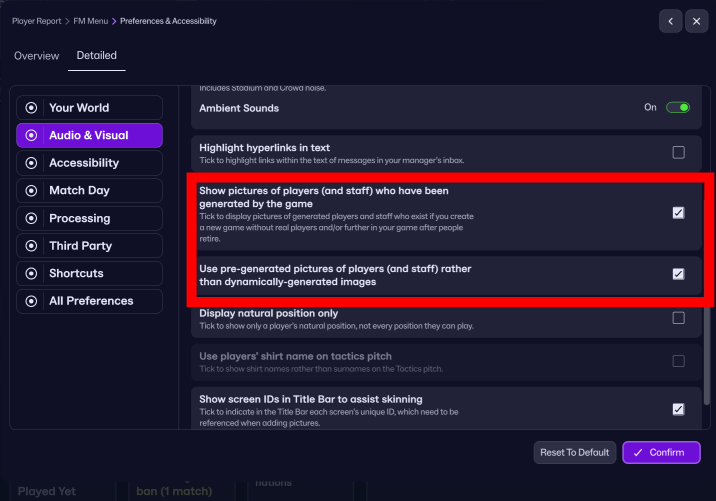
5. Start FM26, go to the Preferences screen, and select "Detailed" in the top menu. Then select "Audio & Visual" in the left menu and check the "Use pre-generated pictures of players (and staff) rather than dynamically-generated images" option (as shown in the screenshot).
6. Restart the game.
To revert (or migrate to my full-featured experience with the custom software), uncheck the "Use pre-generated pictures of players (and staff) rather than dynamically-generated images" option and copy the original bundle (that you backed up in step 3) back into the FM26 directory.
If you are interested in FM24 version with shortlist export method for both Windows and Mac you can still download and use the old 25 version of the software below.
This is project costs me 100-200e monthly to develop and support, so your donations are greatly appreciated!
Stay tuned!
///////////////////////
BELOW IS THE OLD SHORTLIST EXPORT METHOD FOR FM23 AND BELOW FOR ALL PLATFORMS:
Due to how diverse the pack is, I had to create my own expanded folder system to accomodate all 55 categories, so the pack requires a custom NG_Regens Manager 25 software
Installation guide:
1 - Get the main NG_Regens facepack here
2 - Copy the NG_Regens folder into your FM Graphics folder. It would be the same folder where you have put the original newgan facepack or where you put real facepacks. In my case that would be “Documents\Sports Interactive\Football Manager 2024\graphics\faces\”
3. Download the NG_Regens Manager 25: Mac
4. Watch the NG_Regens Manager 25 guide on Youtube
If you need a detailed video guide on shortlist export process you can find it here
Deepdive into new version 1.2 features
I will redo all three current Youtube videos into one, but this is a time consuming process, so bear with me.
F.A.Q.
Q: Why did you create a new folder structure? / How can I unpack your pack into the old NewGAN "Italmed/YugoGreek..." folders?
A:
First off, huge shoutout to the original NewGAN team—they did an amazing job, and their work is still being used by thousands of people today. Even my project builds on the filters and views they created, so big respect to them. Seriously, none of this would be possible without their foundation.
That said, the original NewGAN pack came out about five years ago, and it was built using the tools and structure available at the time. It only has 14 categories for the entire world. A lot of care went into the big football nations, but unfortunately, many other countries kind of got lumped together in ways that don’t really make sense.
Let’s do a little experiment: I could show you a few images from my pack, each from a different category. In the old NewGAN setup, all of those would’ve ended up in the same group—meaning a player from one of those countries could randomly get any of those faces.

Notice the difference? That’s why it’s just not possible to repackage my set back into the old structure without losing all the nuance (or simply creating a mess).


![FM26 Data Tweaks [v3.6 | v5.0]](https://fmdatatweaks.com/wp-content/uploads/fmdt-cover.webp)



Discussion: NG_Regens Newgen Megapack with Women's Football Pack 3 - FM26, FM24 and below
426 comments have been posted so far.
For example, most of Latin America, the Caribbean, Belgium, and Switzerland don’t rely on static mappings (even though you'll see them listed in the table—they're just not actually used).
Here are the main packs used for Latin America:
Mestizo, AfroCaribbean, IndigenousSA, MixedRace, Spain, Italy, Portugal
Belgium pulls mostly from France and Netherlands, while Switzerland pulls from France, CentralEurope, and Italy.
Now, if players have non-default ethnicities, the rules shift a bit—for instance:
Belgium may pull from Congo
Switzerland might pull from Albania/Kosovo, etc.
So yeah, the system's pretty flexible and tries to match things as naturally as possible!. If this whole thing is a thing for FM26 onwards I have some ideas how make this even more cool.
P.S. Picture Pack 2 comes in the next couple of days, I just need to get France sorted (and it is harder than I expected)
{
"Ethnics": {
"AFG": "Iran",
"AIA": "Afrocaribbean",
"ALB": "AlbanianGreek",
"ALG": "Maghreb",
"AND": "Spain",
If you try to add my folders into the old NewGAN structure, you’ll end up with stuff like Czech players getting Kazakh faces. It’s not just a small mismatch—my folders include ethnicities that straight up don’t exist in the original NewGAN setup. So trying to force them in would break the realism or simply make it look stupid.
Now, if you want to merge the old NewGAN folders into mine, that’s generally doable. Just keep in mind, some categories will end up with way more pictures than others. But if you're okay with that, here's roughly how I’d approach it—starting with the easiest matches and moving toward the ones that are kind of a stretch:
Italmed - easy, dump everything into Italia
Scandinavian - easy, dump into Scandinavian
Caucasian - dump all into Anglosphere or split with Ireland
YugoGreek - split between AlbanianGreek and WestBalkan
SpanMed - split between Spain and Portugal
MENA - dump into Maghreb, maybe also drop some into Turkish
Asian - split between China, Japan and Korea
Seasian - split between MainlandSEA, Vietnam, Filipino, Singapur, Indonesia and Malaysia
MESA - split between Mashriq, Iran and ArabGulf
African - I guess split between Afrocaribbean, CentralAfrica, EastAfrica, SahelianAfrica, SouthernAfrica, HornOfAfrica and WestAfrica. But I guess you already see the issue here.
South American and SAMed - I guess into Mestizo, but thats a big stretch already.
Central European - Split between CentralEurope, Netherlands, France, WestSlavic, Hungary and Poland.
EECA - I have no idea, this is the most senseless folder of them all. I guess split between EastSlavic, Baltics, Finstonia, Caucasus and Armenia just to rise the picture count there.
As you can see, there are a few of my folders that I don’t even mention here—CentralAsia, Uzbekistan, PacificIslanders, MixedRace, SouthAsia—because there are simply no equivalents for them in the original NewGAN.
So yeah, technically you could try to do it in reverse and fit my pack into the old structure, but honestly, it doesn’t really make sense for the second half of the folders. There's just no proper place for them to go in that setup.
Don't get me wrong, your work is better and more accurate than previous versions, that's understandable, but if I have to choose your 90,000 thousand with more accurate distribution of new newgens, I'd rather add them to the 300,000 thousand from older versions and have 390,000 (even though they will be less accurate distributed to countries
Best regards
And if you added such an explanation in your package for those who do not want to give up the previous packages and just combine them all together, it would be great
many people would definitely be grateful to you and your package would definitely be universal then : )
In short:
Unpack my new folders in parallel to your old ones. So, for example, the new “Italy” folder should be next to your old “Italmed” folder. Then, start my program, point it to that one big folder, and use "Preserve" mode to generate new faces for your current save.
This way:
Your old regens (who already have a face assigned) will keep their existing faces.
All new regens will get faces from my new pack.
The old folders won’t be used anymore to generate new faces — they’ll only display faces that are already mapped in your current config.xml.
If it were technically possible to keep using the old structure and still have a realistic setup, I absolutely would’ve stuck with it. I wouldn’t have spent time building new software. But as I’ve said before, I just don’t see how that’s possible with any level of realism.
And just to be clear — I’m in no way criticizing the NewGAN creators. They’ve done an amazing job with the tools they had at the time. Massive respect to them. I still use their views and filters to this day in this project.
If you already have a save going, you can even dump the old folders into my new ones (or the other way around), and my software will generate new mappings using the new faces — but it will keep your old NewGAN faces for players that already have them. That way, you won’t lose anything in your current save.
Honestly, I have no idea how to make realistic enough faces using the old NewGAN system. It’s just way too ungranular.
Take East Asia, for example — it’s all in a single folder. If I only have generic Asian-looking faces, fine. But if I’ve got Japanese, Korean, and Chinese faces, where am I supposed to put them? All in the same folder? Then you’ll end up with Japanese players having Korean faces, Koreans with Chinese faces, etc.
Same thing with other folders: Czechia, Estonia, Russia, Georgia, and Kazakhstan are all lumped into one. Every Black-looking person on Earth gets thrown into a single folder. The only regions that are granular enough are Western/Northern Europe, and maybe parts of South America. There are only like 11 or 12 categories for the whole world...
1) Test Default Faces:
Move the current config.xml out of the NG_Regens folder, then reload your FM skin.
Expected result: All regens should revert to the default SI faces.
2) Test Fresh Mapping:
If the first test works as expected, then—without moving the original config.xml back—start the program and generate a completely new set of mappings from your RTF export.
(The program should automatically default to “Generate” mode when no config.xml is present.)
Once that’s done, go back to FM and reload your skin.
Expected result: All regens should now have appropriate faces from my pack.
If the second test doesn’t work as expected, could you please zip the following and send them to [email protected]:
Your original (backed-up) config.xml
The newly generated config.xml
Your RTF export file
Cheers, mate! Let me know how it goes.
@daniswara you can theoretically use the old one, but I would appreciate if you would switch to the new software, as that would allow me to distribute you smaller facepacks faster without the need to update all the reddit/fms/siosi/etc pages all the time. New software can also replace old files with new correctly of you have a save going (or only replace those files that are unused by your current config.xml)
Quick question: Do I need to download the custom NG Regens Manager to use Picture Pack 1? The old Big Pack was working fine with the previous NewGan Manager you provided earlier. Or can I just drag and replace Picture Pack 1 into my old Big Pack folder?
https://www.mediafire.com/file/e6mx4ewot1350s9/NG_RegensPack_withPP1.zip/file
(It is also correct on my reddit page)
Scandinavia - Denmark/Faroe/Norway/Sweden
East Slavic - Belarus/Russia/Ukraine
Central Asia - Kazakhstan/Kyrgyzstan
Caucasus - Georgia
Armenia
That should up the quality of the pictures quite significantly for those categories as they are one of the oldest in this pack. I also aim to at least double the ammount of pictures for Georgia and Armenia to make them fully playable for Build a Nation long term saves.
You will ofcourse have an option between keeping the old photos and adding those new to the mix or simply replacing the old with new (which I would recommend for new savegames).
Dont have ETA yet, but may be a week or two max.