



I would like to share with you my newgen replacement pack. The pack currently consists of:
200,000 male player pictures across 60 different ethnicity categories
45,000 female player pictures across 32 different ethnicity categories. Got major update with Womens Football 3 pack from June.
18,000 staff pictures for both male and female.
You can have a preview of my pictures and (almost all) ethnicity categories here:
MALE PICTURE SHOWCASE
FEMALE PICTURE SHOWCASE
For FM26, you can get the pack in two versions:
a) Single Bundle File (NG_Regens Lite Experience)
This is a single bundle file that you can place in your FM26 folder. It's easy to install and use, but it's significantly limited in what it can do, how many faces it includes, and what methods are used to assign faces to newgens.
b) Full Experience with Custom Software
I recommend the full experience with my custom software. It supports more than 15 times the number of pictures, categories, and assignment methods.
FULL VERSION for Mac and LINUX/SteamDeck(FM26, FM24 and FM23)
I have a completely new version for you that reads information directly from Savefiles and requires no SIP deactivation and no sudo. It is in early testing stage, but I still think it is better for you to go directly that way now as the experience is THAT much better. Another major difference: You do not need to have the game running in the background. You still can, but it is no longer required.
Follow the guide here:
FM26/FM24/FM23 MAC/STEAMDECK/LINUX GUIDE
FULL VERSION FOR WINDOWS(FM26, FM24 and FM23)
On Windows at this point in time you actually have a choice between two different versions. The one that reads information directly from a running FM instance and the new one that reads all information from a savefile. As of April I think it safe to switch my recomendation. I now recommend you start with the Savereader method. Only if for some reason it doesnt work for you should fallback to the memory reader. For FM23 you have to go the savefile reader method.
Try this first: FM26/FM24/FM23 WINDOWS SAVEFILE READER METHOD GUIDE
If you have problems, try this instead: FM26/FM24 WINDOWS MEMORY READER METHOD GUIDE
If you can open the page from your phone, but not from your pc, then it is your Windows Antivirus/WebFilter - You can try to whitelist *.ngregens.org somewhere in its settings. As another workaround you can try to set your Windows DNS Settings to use Google DNS 8.8.8.8 or Cloudflare DNS 1.1.1.1. You can find (not mine) guide on how to do that on your Windows machine here
THE BUNDLE REPLACEMENT METHOD:
If you're on Windows, I strongly recommend using the full experience of the pack with my custom software. However, if your platform isn't supported yet or you don't want to deal with the software I've created, I have a bundle file for you to use with the bundle replacement method. Just keep in mind that this bundle represents only about 5-10% of the full experience (it's not me limiting you to force software adoption - this is simply how the bundle method works).
1. Download the updated bundle file from here: https://download.ngregens.org/ui-newgen-portraits_assets_all.bundle
2. Go to your FM26 install directory. By default, it should be \Steam\steamapps\common\Football Manager 26\fm_Data\StreamingAssets\aa\StandaloneWindows64\
3. Make a backup of the ui-newgen-portraits_assets_all.bundle file in case you want to revert to default faces.
4. Copy the file you downloaded in step 1 into the FM26 folder, replacing the original file.
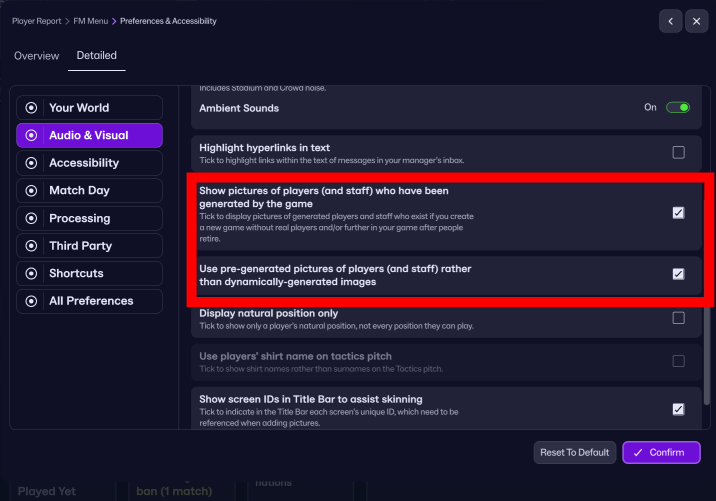
5. Start FM26, go to the Preferences screen, and select "Detailed" in the top menu. Then select "Audio & Visual" in the left menu and check the "Use pre-generated pictures of players (and staff) rather than dynamically-generated images" option (as shown in the screenshot).
6. Restart the game.
To revert (or migrate to my full-featured experience with the custom software), uncheck the "Use pre-generated pictures of players (and staff) rather than dynamically-generated images" option and copy the original bundle (that you backed up in step 3) back into the FM26 directory.
If you are interested in FM24 version with shortlist export method for both Windows and Mac you can still download and use the old 25 version of the software below.
This is project costs me 100-200e monthly to develop and support, so your donations are greatly appreciated!
Stay tuned!
///////////////////////
BELOW IS THE OLD SHORTLIST EXPORT METHOD FOR FM23 AND BELOW FOR ALL PLATFORMS:
Due to how diverse the pack is, I had to create my own expanded folder system to accomodate all 55 categories, so the pack requires a custom NG_Regens Manager 25 software
Installation guide:
1 - Get the main NG_Regens facepack here
2 - Copy the NG_Regens folder into your FM Graphics folder. It would be the same folder where you have put the original newgan facepack or where you put real facepacks. In my case that would be “Documents\Sports Interactive\Football Manager 2024\graphics\faces\”
3. Download the NG_Regens Manager 25: Mac
4. Watch the NG_Regens Manager 25 guide on Youtube
If you need a detailed video guide on shortlist export process you can find it here
Deepdive into new version 1.2 features
I will redo all three current Youtube videos into one, but this is a time consuming process, so bear with me.
F.A.Q.
Q: Why did you create a new folder structure? / How can I unpack your pack into the old NewGAN "Italmed/YugoGreek..." folders?
A:
First off, huge shoutout to the original NewGAN team—they did an amazing job, and their work is still being used by thousands of people today. Even my project builds on the filters and views they created, so big respect to them. Seriously, none of this would be possible without their foundation.
That said, the original NewGAN pack came out about five years ago, and it was built using the tools and structure available at the time. It only has 14 categories for the entire world. A lot of care went into the big football nations, but unfortunately, many other countries kind of got lumped together in ways that don’t really make sense.
Let’s do a little experiment: I could show you a few images from my pack, each from a different category. In the old NewGAN setup, all of those would’ve ended up in the same group—meaning a player from one of those countries could randomly get any of those faces.

Notice the difference? That’s why it’s just not possible to repackage my set back into the old structure without losing all the nuance (or simply creating a mess).

![FM26 Data Tweaks [v3.6 | v5.0]](https://fmdatatweaks.com/wp-content/uploads/fmdt-cover.webp)



Discussion: NG_Regens Newgen Megapack with Women's Football Pack 3 - FM26, FM24 and below
426 comments have been posted so far.