Download Now
Downloads: 30292 / Size: 5.7 MB / Added: 2023-10-27
Lost your premium key? No problem — retrieve it automatically here:
http://davydepuydt.com/getkey.aspx
Do any of these frustrations sound familiar? If so, FM+ is the tool you’ve been waiting for — it solves them all!
- Conflicting staff ratings — Every coach gives your players different stars and advice. Who can you trust?
- Contradictory screens — Quick Pick, Player Pages, Tactic Pages, Selection Advice… which one is actually correct?
- Unclear best lineup — With so many opinions, figuring out your strongest XI takes way too long.
- Tactical headaches — FM offers no simple way to compare tactics and see which ones suit your squad best.
- Scouting disappointments — You finally land your dream signing… only to discover he’s a 2.5-star benchwarmer because your staff misjudged him.
- New jobs take forever — Excited to manage a new team, but spend hours digging through data just to understand the squad.
- Returning to old saves feels overwhelming — You load an old career and have no idea who’s who or what strategy you used.
- Youth development confusion — Unsure which youngsters are worth investing in, you either overanalyze endlessly or waste time managing too many “just in case.”
- Less time to play, more frustration — You want to enjoy FM and make progress, not get stuck in hours of tedious micromanaging.
|
Sounds familiar? Here’s the good news: FM+ solves all these problems and gives you back the fun, control, and excitement you love about Football Manager!
![]()
![]()
FM+'s top features
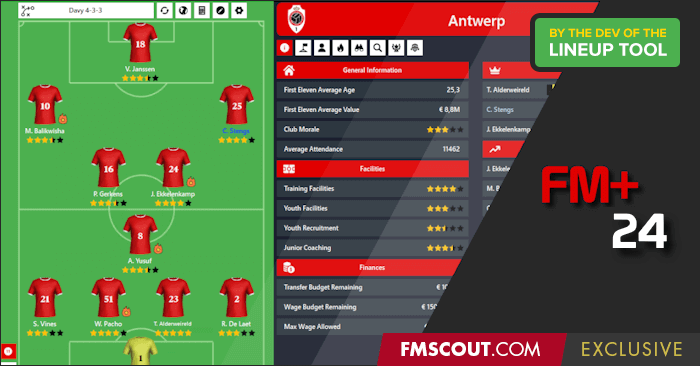
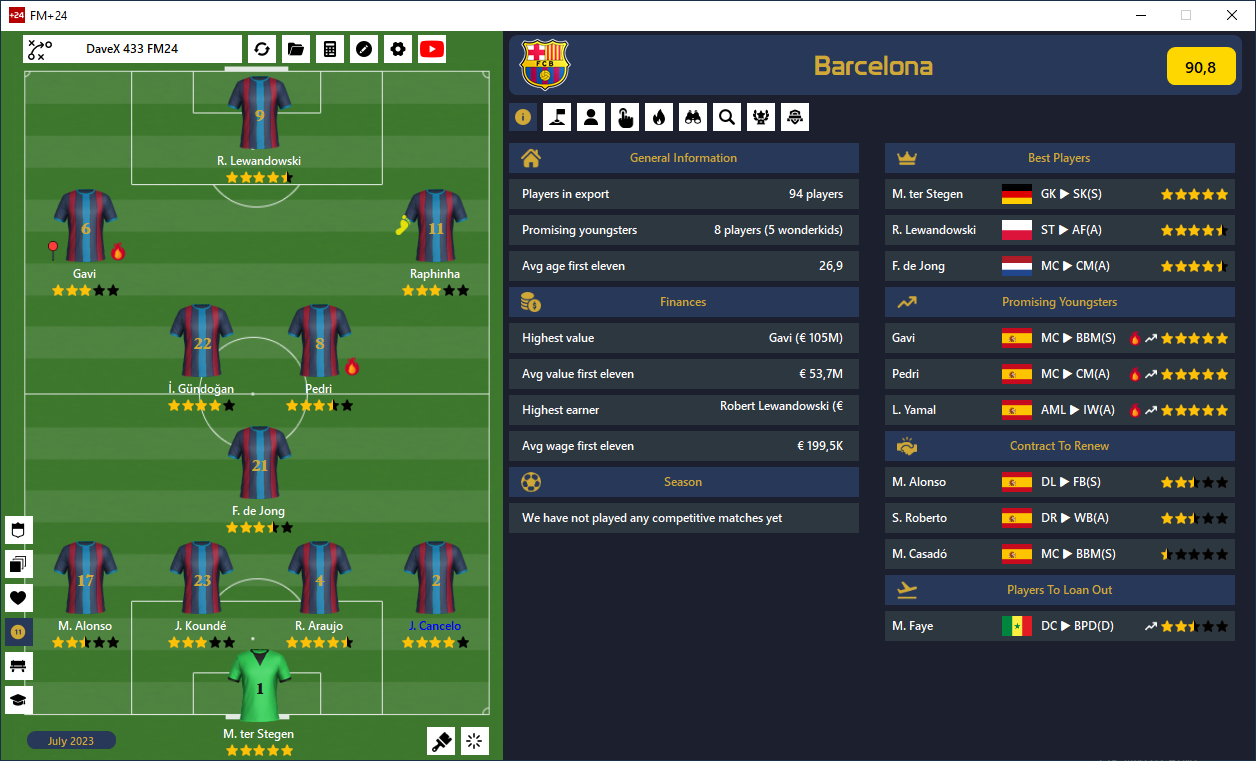
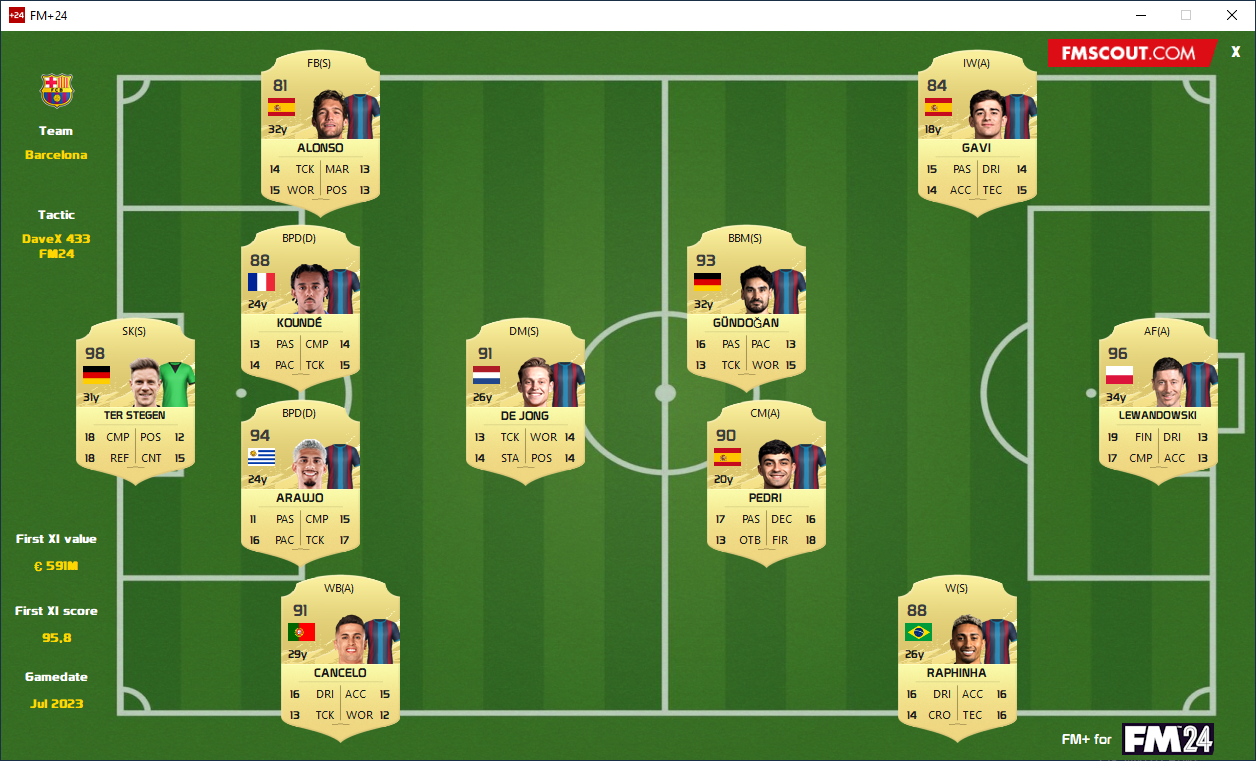
- Lineup advice: Best eleven, bench, squad depth and best available
- Tactic advice: Compare tactics and see which tactic gets the highest score for your players
- Comprehensive star ratings: Players (both own & scouted) get a clear CA & PA star rating that is not subjective to any staff member, simple, good and trustworthy
- Seperate page to manage your youngsters, see who's worth putting your effort in and how good they'll probably become
- Load your scouted players into FM+ and get a trustworthy opinion on them, after signing them, their star rating will stay the same
- Team info: Get familiar with a new team, or with an old save in the blink of an eye. FM+ shows you in a single page a summary of your team, who are the stars, who are the brightest youth prospects, who you should loan out and who you should offer a new contract.
- This is a no-cheat tool, it doesn't use any hidden info like other editors, all information shown comes from values and attributes visible to the player. The tool automates what you can do in your head, on paper or in Excel in a much faster and more user friendly way
|
Can't get enough of FM+24? there is a premium version which will unlock more FM pleasure and game-time for you
![]() Premium Edition Premium Edition
- No season limit (Free version loads only data from game start year)
- Import your scouted players
- Support for managing National teams
- Calculate best tactic for your team / Compare tactics
- View World's best players and Next gen list
- Create filter directly in FM for who to callup for your national team
- Open player you are viewing in FM+ directly in FM
A premium license key is a one time € 5.99 payment (no subscription) |
Before buying the premium version we strongly suggest you to try out the free version to check compatibility with your system and FM game. As FM+ is a spare time project next to a fulltime job and family life, we do not guarantee any support or refunds when things are not working as expected. That is why there is a free version to try out
How FM+ works
FM+ now uses exports made from Football Manager instead of directly reading the FM process Memory (like older FM+ versions did).
This might seem a bit more complex at first, but it comes with a lot of benefits compared to "reading from memory":
- All players are available, also those who became Player/Staff
- FM+ will keep working after FM has been patched, no update to FM+ needed
- No-Cheat tool, FM+ is purely based on what you can 'see' as a player
- A lot more stats accessible for FM+ to make the tool even more immersive and useful
- FM+ is no longer dependent on the work of others or on the memory structure of FM
However a "quick load" option might be added in the near feature, now that it has been announced that there will come an updated version of the component that can read directly from memory
|
Supported FM Languages
Since FM+ now uses exports to show you the data (explained above), the language in which your FM is set is now important.
At the moment following FM languages are supported. (we might add extra languages in the future):
- English
- German
- Spanish
- Italian
- Dutch
- French
- Portuguese
- Greek
Current supported currencies:
"HK$", "$", "€", "¥", "£", "₹", "₽", "₺", "₿", "฿", "₫", "zl", "kr", "DKK", "KM"
|
Download Now
Downloads: 30292 / Size: 5.7 MB / Added: 2023-10-27



 Premium Edition







Discussion: FM+24 - Lineup, Tactic and Ratings Tool
334 comments have been posted so far.
I sent you an email five days ago and you haven't replied
Glad you like it.
About the fmf file, it's something I've been investigating for quite some time but haven't figured out yet. I'm not giving up though and I'm still trying to get it in
@PoirotKetchup, I'll try to have a look this evening, full house with all the kids here today and it's a "kids holiday", so lot of action going on :p
I'm no programmer, so have no idea on the feasibility, but in the long-term, would it be possible to just import .fmf tactic files? More than happy with what we have for now, but would love to be able to just bulk copy-paste over some tactic files for the calculator.
(if you can't find it, pass me the email linked to your paypal account, I can track it and resent it to that email)
* Added caching of the logos and faces so tool launches faster for those with huge facepacks
* Added DaveX 433 FM24 tactic - a realistic PlugAndPlay tactic (both FM+ tactic and fmf file for the game)
You can find the tactic fmf file in the fmplus\TacticFile subfolder
@coolestrock, those are debug information, I can't tell you by heart what it means, but it's their RCA (or something that resembles RSA and than how big of a fit the role is compared to the best fitted role)
Danke
So let's say a player has 13.40 (98%) , what does thes mean, I've played around it seems the first is the average of the attributes for role , but they don't add up fully some are slightly higher than the number on the calculator,
cheers
Is there a way to import the tactics from the game into the program?
It's not really necessary, but it would save time compared to having to enter tactics into the program manually
Thanks for your great work, that's why I supported you twice for both of my computers
if FM+24 doesn't open, delete everything in %appdata%\fmplus24
if you need to reinstall, normally it remembers key, if not, you can just re-enter the same key, it will still work
But nice suggestion for future version to add possibility so user can select their own attributes. I'll add it to the todo list