Search
On FM Scout you can chat about Football Manager in real time since 2011. Here are 10 reasons to join!

FME - Zealand | 1.1.0

The official Zealand skin for Football Manager 2023, brought to you by FMEnhanced.

By Updated on Nov 18, 2022   933624 views   173 comments
Download Now
Downloads: 395514 / Size: 15.8 MB / Added: 2022-11-08
Football Manager 2023 Skins - FME - Zealand | 1.1.0

SKIN FEATURES


User Interface

  • Custom Backgrounds are supported, albeit through a semi-transparent screen for best legibility.
  • The theme is generally dark with coloured accents.

Active Leagues

  • When starting a new game and choosing your Active Leagues, you are now able to sort the columns to easily see which mode you have league set to.

Manager Home Pane

  • Same as last year with no modifications as of yet.

Tactics

  • Minor changes to the tactics panel, mainly the modified player icon to include the players image.

Individual Training

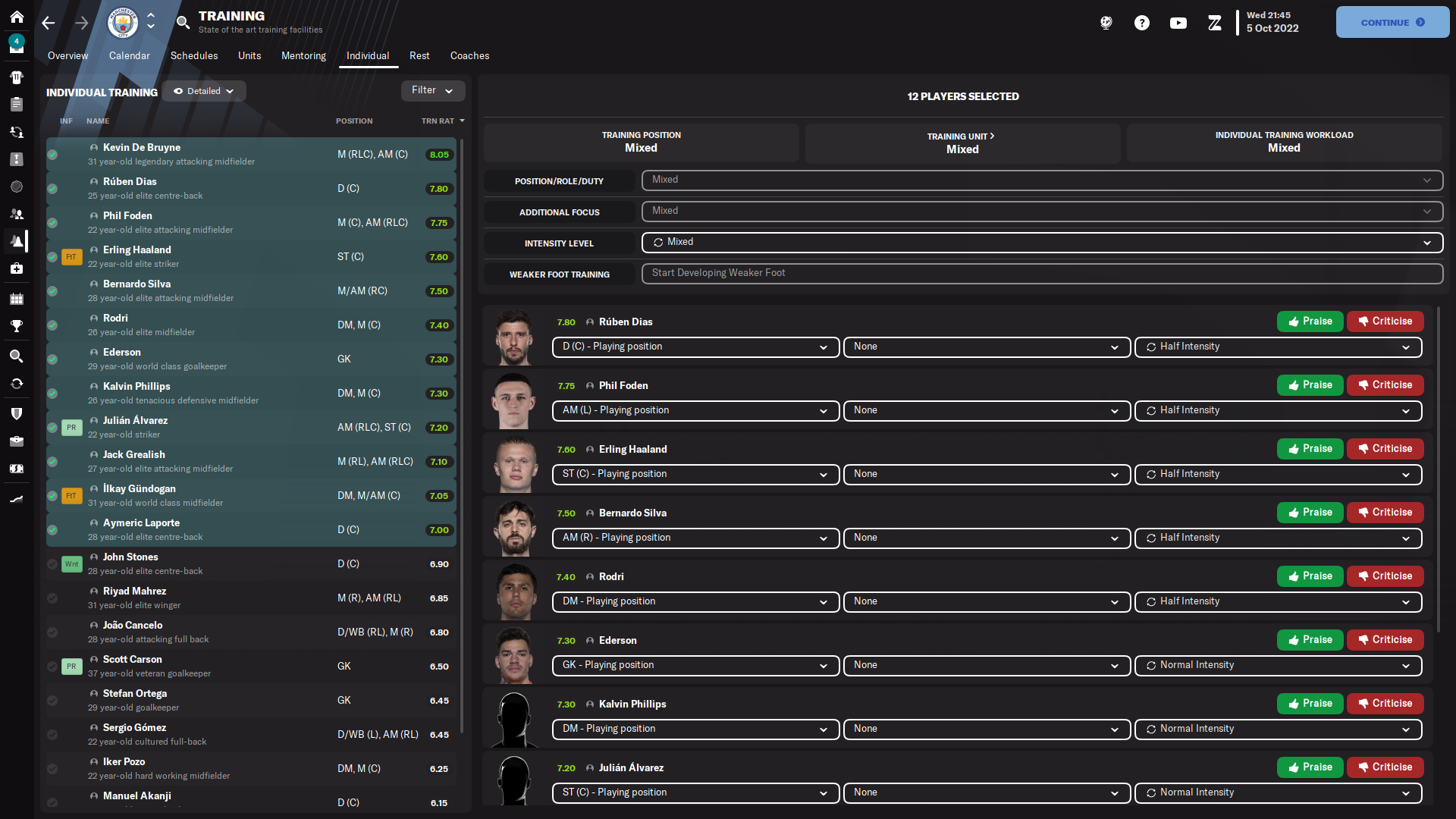
  • I have modified the Individual Training panel so that when multiple players are selected, the user can Praise/Criticise training performance much faster. Selected players show up as part of a list, all with their own Praise/Criticise buttons which disappear when an action has been completed. No more clicking back and forth.

Schedule

  • The fixture details panel is the same as last year, better showcasing fixtures and results by including the stadium image and event details.

Scouting

  • Last year, I secretly made it possible to create your own Scouting Views by right clicking on the Scouting Table. This is not possible in the default skin, though was added by request.
  • A specific NewGan View has been added by default so that importing faces from NewGan can be done a lot more easily.

Club Overview

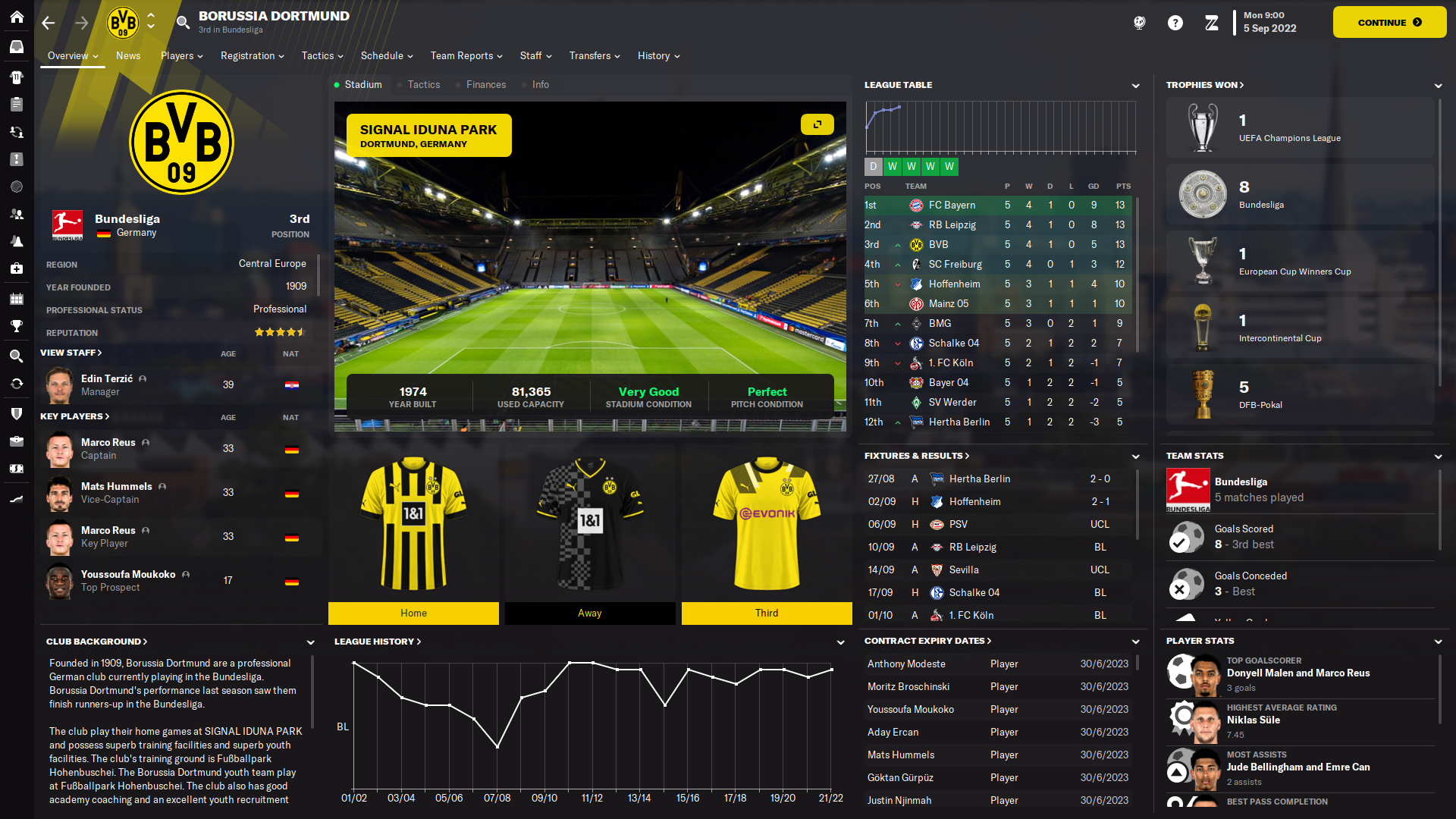
  • The Club Overview has been entirely overhauled since last year to better display relevant club information.

Match

  • The touchline tablet is currently unchanged from last year, as is the scoreboard.
  • The official Champions League scoreboard has been updated to include club logos, mirroring other official Champions League graphics.

Player Overview

  • As always, the highlight of any FME Skin is the Player Overview. I have opted for a "Player Card" design and remodelled the lower section containing the smaller "selector panels".

Zealand Tutorials

  • Just like last year, players are able to quickly jump into any relevant Zealand tutorial from wherever they may be in the game. Sections have specific tutorials assigned to them and can be viewed by clicking on the YouTube icon which appears at the top of the screen.

Social Media

  • All relevant Zealand Social Media links are present from within the game menu so that all followers and fans alike can quickly catch up on and keep up to date with all Zealand news, video releases and streams.

UPDATE 1.1.0

This is a minor update. The UI has an updated look and feel, and the Player Popup has been renewed in order to be more useful. More to come, but that's it for now folks.

If for any reason you're looking for the previous version, here it is:
Download FME Zealand v1.0


SKIN PREVIEW

Player Overview


Club Overview

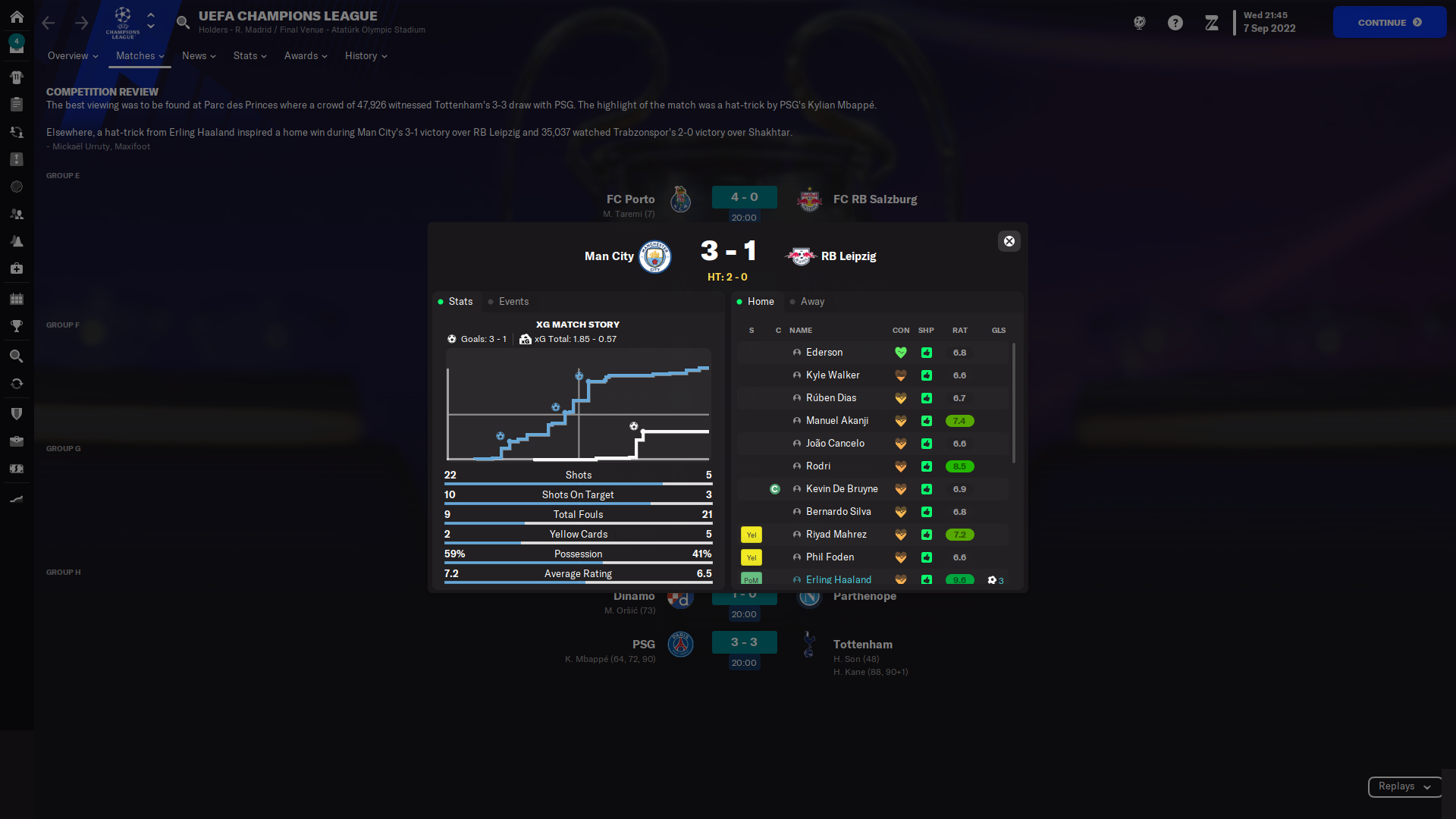
Simulated Match Report

Praise/Criticise Training


How to use the FME - Zealand skin on FM23

Move the downloaded .fmf file to your skins folders, by default located at:
> Documents > Sports Interactive > Football Manager 2023 > skins >

Go to preferences in-game, select the skin and hit Confirm.

Download Now
Downloads: 395514 / Size: 15.8 MB / Added: 2022-11-08
FMS's avatar
About FMS

Hi there. I'm the FMScout bot. My mission is to facilitate. I currently lack AI, so please don't expect me to reply to any messages.

Your content on FM Scout

We are always looking for quality content creators, capable of producing insightful articles. Being published here means more exposure and recognition for you.

Do YOU have what it takes?

Discussion: FME - Zealand | 1.1.0

173 comments have been posted so far.

  • rjhsteel2001's avatar
    Scouting Recruitment focus Screen....can't edit to see Potential and Current Ability
  • DaleNiland2k711kk's avatar
    hello i need some help, when i use this skin, every team has a generic stadium where the stadium is supposed to be in the club info, i have file on my graphics, backgrounds, mini stadiums, but for some reason the stadiums are not showing on this skin, well I've tried others and real stadiums for each team doesn't go into the stadium section
  • moussjul's avatar
    Hi.
    After setting up tabs in the player overview, when I go anywhere in the game and come back to same or another player profile, all settings are lost and tab "plans" fill in the majority of slots... Any idea? Thanks. Good work btw. This skin is the most practical and complete.
    2
  • proton6's avatar
    Tactics screen ... Goalkeepers name is cut out ... Full screen using 1920
  • ProfesorArena's avatar
    Does it work fine at 768p resolution?
  • mattmcm's avatar
    @stollaz +1 on the player profile pop-up. i relied heavily on seeing the footedness of players on that screen, would love to see it back.

    Other than that, really like the skin!! Cheers to all involved.
    1
  • stollaz's avatar
    Couple of things: when hovering the icon to view a player's profile from another screen, there doesn't seem to be attribute highlighting for best role like there was in the FM22 skin - would love that back, as it makes scouting and quick picking of players so much easier. I think someone else has mentioned it too but it would be great to see footedness in that view too. Also not sure if it's just me, but I seem to have scrollbars on the attribute columns, so for example I can't see someone's work rate properly without scrolling, and height and weight are both trying to fit on a row that's only tall enough for 1 element so it gives another scrollbar. I loved the FM22 skin and couldn't play without it but it feels like the current version of this skin has a lot less functionality at the moment (though admittedly I'm only focusing on the player overview hover so maybe the rest is fine), so hope it can be improved upon soon since it could be great still!

    Have posted screenshots in the imgur linked below to illustrate what I'm seeing vs what I'm comparing it to, in case what I'm seeing isn't typical

    Imgur Link
    3
  • fernandorita04's avatar
    I'm missing the player profile page so I can't see the CA and PA stars, does anyone have the same problem?
  • OlivierL's avatar
    i found the Pa and CA stars, the only thing i miss when i hoover over a player is the left/right foot info. but that is reported already here :) love the training option - multiple praise of criticise !
  • Peaknick's avatar
    Thank you for your work! Truly the best skin for FM
  • jim.greene13's avatar
    hi, ive downloaded the skin but when i put it in the skins folder for fm23 it wont show up in preferences, any ideas?
  • OlivierL's avatar
    Thanks for this nice skin ! i'm missing two things. The club value and facilities on the profile page (now i have to scroll to see the facilities and i can't find club value)
    and if i hoover over a player , i want to see his CA and PA stars, this is not included i think , Thanks for what you already did.
  • noobcake's avatar
    For me the one big flaw of this skin is the amount of space each row takes up on the squad screen... it feels like modern web design which is really inefficient for a spreadsheet game like FM
    1
  • LegendMonkey060's avatar
    I have some feedback. When you look at a player from the tactic screen (like in this picture) I cannot see what 's the stronger foot for the player. Little thing maybe, but would be useful!
  • Tototor's avatar
    Hello, the skin does not seem to support the 110% font format (i'm an old man, i need this). The left bar is constently off screen.

    Thx.
  • Shaunessy1983's avatar
    Hi, Great skin. I have noted though on the tactic screen the players position rating is not shown. Can this please be added as it was in FM22?
    Screenshot...
  • MaxBubu's avatar
    Hi
    great work as always !
    @FMEnhanced
    quick thing i noticed,right away,
    on some players, not all but a fair amount, i get "goals" the short terms and long terms one, in 7 of the box bellow the stats (minus the season stats but allo the one above and on the right side)

    https://imgur.com/a/Yx3xcox
  • esarbee's avatar
    Hi there , great work as always. One question though - on one skin I used briefly in the beta, at half time it gave a three point player analysis for each team (Kyle Walker won possession more than any other player, struggled for possession in opposition half)..is there any way to access that with this skin? Thanks again!
  • footballdiv's avatar
    Hi, is there a way to show more players in the competition screen: https://i.imgur.com/p9fs7nK.png
  • theonlyen's avatar
    can you also add pictures on squad view, also in the scouting area when browsing for players?
  • Rehnzy's avatar
    Dear fm gods. Please give us the option to show footedness in the info when hovering a player. My main criteria for scouting players are attributes and either-footedness.
  • Tengildek's avatar
    Is there any way for us to make the day-skipping screen bigger?
  • peireweust's avatar
    Hi @FMEnhanced, thanks for the skin! Amazing work once again.

    Just wondering if it's also in your plans to add the left/right foot proficiency levels in the profile hover like it was in the FM22 skin? Really loved that feature specifically for the opposition instructions pre game.
  • Dohny's avatar
    The skin hides penalty counter in-game
    2
  • JeanTiagoPT's avatar
    Hey @FMEnhanced , good work again! Is the 1366x766 screen compatibility going to be available this year, like last?

FMS Chat

Stam
hey, just wanted to let you know that we have a fb style chat for our members. login or sign up to start chatting.