Search
On FM Scout you can chat about Football Manager in real time since 2011. Here are 10 reasons to join!

NG_Regens Newgen Megapack with Women's Football Pack 2 - FM26, FM24 and below

A newgen megapack with around 195 000 pictures including a Women's Football Pack (WIP) and a Staff Pack with support for FM26 (bundle or with management software), FM24 and below.

By Updated on Jan 13, 2026   342 comments
Download Now
Size: 3.1 GB / Added: 2025-05-25
Football Manager 2026 Facepacks - NG_Regens Newgen Megapack with Women's Football Pack 2 - FM26, FM24 and below
Hello guys!

I would like to share with you my newgen replacement pack. The pack currently consists of:

160,000 male player pictures across 60 different ethnicity categories
18000 female player pictures - this base pack is still under development, not every nation/ethnicity is covered yet.
18000 staff pictures for both male and female.

You can have a preview of my pictures and (almost all) ethnicity categories here:
MALE PICTURE SHOWCASE
FEMALE PICTURE SHOWCASE

For FM26, you can get the pack in two versions:

a) Single Bundle File (NG_Regens Lite Experience)
This is a single bundle file that you can place in your FM26 folder. It's easy to install and use, but it's significantly limited in what it can do, how many faces it includes, and what methods are used to assign faces to newgens.

b) Full Experience with Custom Software
For Windows (FM26 and FM24) and Mac (FM26 or FM24 with the old shortlist method on the old 25 verison of the software) users I recommend the full experience with my custom software. It supports more than 10 times the number of pictures, categories, and assignment methods. For FM26 I'm currently investigating how to port this to Steam Deck.

THE FULL VERSION FOR WINDOWS(FM26 AND FM24) and macOS (FM26 only):

Follow the guide here:
FM26/FM24 WINDOWS GUIDE
or
FM26 MAC EARLY BETA GUIDE - Mac version is in VERY early beta stage, so errors are more than possible. Please report your issues in the comment section and I will get back to you.

If you can open the page from your phone, but not from your pc, then it is your Windows Antivirus/WebFilter - You can try to whitelist *.ngregens.org somewhere in its settings. As another workaround you can try to set your Windows DNS Settings to use Google DNS 8.8.8.8 or Cloudflare DNS 1.1.1.1. You can find (not mine) guide on how to do that on your Windows machine here


THE BUNDLE REPLACEMENT METHOD:

If you're on Windows, I strongly recommend using the full experience of the pack with my custom software. However, if your platform isn't supported yet or you don't want to deal with the software I've created, I have a bundle file for you to use with the bundle replacement method. Just keep in mind that this bundle represents only about 5-10% of the full experience (it's not me limiting you to force software adoption - this is simply how the bundle method works).

1. Download the updated bundle file from here: https://download.ngregens.org/ui-newgen-portraits_assets_all.bundle
2. Go to your FM26 install directory. By default, it should be \Steam\steamapps\common\Football Manager 26\fm_Data\StreamingAssets\aa\StandaloneWindows64\
3. Make a backup of the ui-newgen-portraits_assets_all.bundle file in case you want to revert to default faces.
4. Copy the file you downloaded in step 1 into the FM26 folder, replacing the original file.
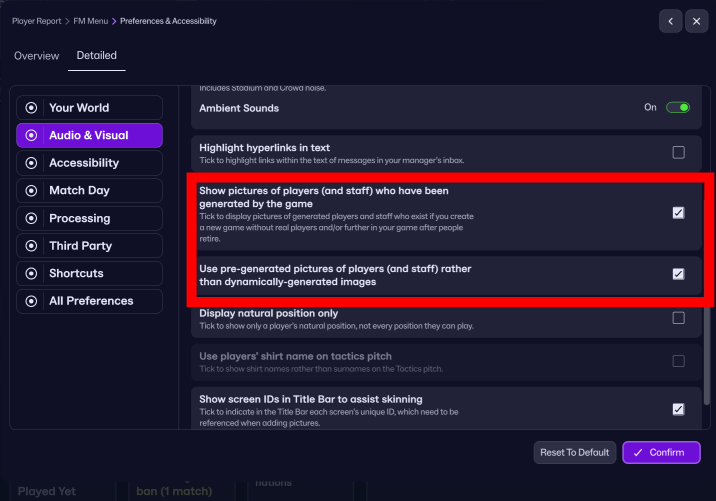
5. Start FM26, go to the Preferences screen, and select "Detailed" in the top menu. Then select "Audio & Visual" in the left menu and check the "Use pre-generated pictures of players (and staff) rather than dynamically-generated images" option (as shown in the screenshot).


6. Restart the game.

To revert (or migrate to my full-featured experience with the custom software), uncheck the "Use pre-generated pictures of players (and staff) rather than dynamically-generated images" option and copy the original bundle (that you backed up in step 3) back into the FM26 directory.


If you are interested in FM24 version with shortlist export method for both Windows and Mac you can still download and use the old 25 version of the software below.

This is project costs me 100-200e monthly to develop and support, so your donations are greatly appreciated!

Stay tuned!


///////////////////////

BELOW IS THE OLD SHORTLIST EXPORT METHOD FOR FM24 AND BELOW FOR ALL PLATFORMS:


Due to how diverse the pack is, I had to create my own expanded folder system to accomodate all 55 categories, so the pack requires a custom NG_Regens Manager 25 software

Installation guide:

1 - Get the main NG_Regens facepack here

2 - Copy the NG_Regens folder into your FM Graphics folder. It would be the same folder where you have put the original newgan facepack or where you put real facepacks. In my case that would be “Documents\Sports Interactive\Football Manager 2024\graphics\faces\”

3. Download the NG_Regens Manager 25: Mac

4. Watch the NG_Regens Manager 25 guide on Youtube
If you need a detailed video guide on shortlist export process you can find it here
Deepdive into new version 1.2 features
I will redo all three current Youtube videos into one, but this is a time consuming process, so bear with me.


If you’ve already got a save going and want to keep your existing regen faces but generate new ones using my latest pack—you’re all good, I’ve got you covered! The program can read both the classic NewGAN format (Zealand’s original one) and the newer FM.Z/URAN format. If anyone’s using a different format, definitely let me know so I can look into it.

Just a heads-up though—this compatibility is one-way:
You can use your old mappings with this tool, but you won’t be able to go back and use classic NewGAN/FM.Z/FMRTE afterwards (or at least, I honestly have no idea what would happen).

So here’s what to do:
Find your current regen pictures folder — this is the folder you've been using as your image folder in NewGAN Manager, FM.Z Manager, or FMRTE.

Copy the contents of the NG_Regens folder from the archive you downloaded in Step 1 of the guide and paste it right into that same image folder.

If you’re using the classic NewGAN format, your folders should now look something like this, with old and new folders side by side at the same level:


There’s just one small caveat: the folder called "Scandinavian" exists in both the old and new packs. But don’t worry—our files have different names, so they won’t overwrite each other.

Here’s what will happen with that specific folder:
Your old face assignments will stay intact—no worries there. The system will treat the "Scandinavian" pics from both packs as part of the same group. That means you might see old faces showing up on new players and if you start a new save and click "Generate", the program will pull from both versions. You’ll basically end up with a Scandinavian mega-pack of around 12,000 pics.

If you’re using the FM.Z/URAN format, your folder structure should look like this:


Just keep them at the same level in the directory and you’re all set!


If you have any questions regarding the installation or anything else, you can leave a comment here, on my youtube channel or you can send me an email to [email protected]

I hope you have fun with the pack and have a very nice day!


F.A.Q.

Q: Why did you create a new folder structure? / How can I unpack your pack into the old NewGAN "Italmed/YugoGreek..." folders?

A:
First off, huge shoutout to the original NewGAN team—they did an amazing job, and their work is still being used by thousands of people today. Even my project builds on the filters and views they created, so big respect to them. Seriously, none of this would be possible without their foundation.

That said, the original NewGAN pack came out about five years ago, and it was built using the tools and structure available at the time. It only has 14 categories for the entire world. A lot of care went into the big football nations, but unfortunately, many other countries kind of got lumped together in ways that don’t really make sense.

Let’s do a little experiment: I could show you a few images from my pack, each from a different category. In the old NewGAN setup, all of those would’ve ended up in the same group—meaning a player from one of those countries could randomly get any of those faces.


Notice the difference? That’s why it’s just not possible to repackage my set back into the old structure without losing all the nuance (or simply creating a mess).

That said, you can totally keep using your existing save where players already have NewGAN faces assigned, and just use my pack for generating new faces. I’ve got a guide on Reddit that walks you through it—look for the section called "Keeping your current regens."

Download Now
Downloads: 47472 / Size: 3.1 GB / Added: 2025-05-25
Your content on FM Scout

We are always looking for quality content creators, capable of producing insightful articles. Being published here means more exposure and recognition for you.

Do YOU have what it takes?

Discussion: NG_Regens Newgen Megapack with Women's Football Pack 2 - FM26, FM24 and below

342 comments have been posted so far.

  • Poska's avatar
    I'm playing on 2 pc (I use steam cloud for my save), do you have a tips for have the sames faces ?
  • cprrylow's avatar
    @gabrielogil31 Mate, you are absolutely right, Im a donkey! I have forgot I turned the old MixedRace pack off for some countries because many photos in that old one were badly cropped. And I have forgotten to turn it back when I released a new MixedRace pack... facepalm.

    I have pushed an updated config, the software will pick it up at the next start.

    Thanks for reporting!
  • gabrielogil31's avatar
    Hi, how are you? I’d like to ask a question. When I apply the faces using your program, it mostly uses the Anglosphere folder to replace players who should be MixedRace. So I end up with players of African or mixed descent getting white faces. Is that supposed to happen, or am I doing something wrong?
  • GNNNN's avatar
    Thanks for the work, what a difference it makes to the game.
    2
  • zamek9's avatar
    thanks for the development, great job
    1
  • Fwied's avatar
    I think you can use with FMRTE but the pictures will not work with correct nations are set up differently.
  • kmalove's avatar
    can use it with fmrte?
  • cprrylow's avatar
    Great to hear that you enjoy it!

    Yes, my plan is to upgrade the whole world to the new picture quality. The next PP will finish Europe, and after that I'll tackle Africa and the rest of Asia.

    In some regions, it's extremely hard to find photos of the right age in good quality, though, so we'll see how it goes.
    1
  • gabrielogil31's avatar
    ?I'd like to thank you for this amazing work! It's the best facepack out there.
    Do you have any plans to update the African faces in general? I feel like they’re a bit behind compared to the others...
    These new faces from the separate packs look fantastic and so diverse, every player feels unique. It's the first time I'm playing FM without being able to tell who’s a newgen or not.
  • cprrylow's avatar
    @dougvdr77 cheers mate, I really appreciate that!

    @edisonliu Hi mate, the application is fully in chinese, the help section in in the software is also in chinese. In my youtube video guides you can turn on automatic chinese subtitles. If you have any specific questions you can email me to [email protected]
  • edisonliu's avatar
    Please send out a Chinese tutorial and software, thank you
  • dougvdr77's avatar
    Congratulations on the great work, I am increasingly impressed with the work you have been doing on this pack.
    1
  • cprrylow's avatar
    @isryi73 Could you please mail me your screenshot and the exported RTF shortlist file to [email protected]? I will take a look at it for you

    @Fwied, yeah super happy, still have 5GB of free tier left! Havardr is a real gigachad!
  • Fwied's avatar
    Crazy that the file is only about 2.5GB. thanks
  • isryi73's avatar
    When generate adds a select shortlist file, it stops without moving on to the next step
  • isryi73's avatar
    When generate adds a select shortlist file, it stops without moving on to the next step. pls help me

  • havardr's avatar
    I just wanted to share a handy site I found: https://if9.me/ — it lets you easily create high-quality macOS .ICNS icons from images files.

    Would you consider providing an official macOS .ICNS icon for NG Regens Manager 25? It’d be great for those of us using the app on macOS to have a native-looking icon.

    Thanks for considering it, and appreciate all the work you’ve put into the project!
  • woejhi's avatar
    Hi, love the pack and really appreciate the frequent updates!

    There is a bug (or feature?) in FM that reallocates and recycles regen UIDs, which is particularly annoying as regens after a couple of years are often left with faces that do not match their profile.

    This has been documented here, and probably explains it better than I can: https://fullerfm.com/2024/12/19/fm24-the-regen-bug/

    I have tried to come up with a fix to this bug, which is admittedly imperfect but gets the job done to some degree. Sorry if it's hard to follow, but the 'fix' boils down to:

    - Search all 15-16 year old newgens in FM and save them as txt file.
    - Use the 'overwrite' feature on the config using this txt file.

    (I have been using the 'overwrite' function in your original newgan manager, which doesn't appear to be a thing in the newer version).

    - This step would keep previously generated faces (of players aged 17+) and gives 15/16 year olds new faces which match their ethnicity.

    (If you wanted to keep faces for certain players below 17 years of age, you can look up their faces beforehand and keep a note so they can be manually reverted once overwritten)

    - Then run a 'preserve' with ALL regens (as normal) to allocate faces to those who have been missed.

    Doing all this twice per season (1st Nov, mid April) catches players before they age out of the 15-16 bracket and may be stuck with a face which does not match their heritage.


    If there was a way to incorporate a feature in the NG manager which associates IDs with names and remembers, I believe the regen bug could be remedied.

    When preserving, regen IDs which have a new player's name attached to them could have their faces overwritten so that they aren't left with an ill-fitting face.

    Apologies if this has been done so already, as said before I have been running an outdated version of the Regen manager. If this isn't possible to implement, could I ask that the 'overwrite' feature be restored to the new NG Regen Manager?

    I just wanted to finish by thanking you for reigniting my interest in FM. Your project is fantastic and has really strengthened the immersion of the game for me!
  • cprrylow's avatar
    Right, so I've chucked all the PPs onto Cloudflare already. Gonna move the big pack over there when PP4 drops - should be end of this week if nothing goes tits up.

    My plan's to set up one permanent link for the main pack, something like ngregens.org/NG_Regens_MainPack.zip, and just swap out the contents each time there's a new release. Software links are gonna stay the same too. That way people can just share those 3 links in their communities without worrying about them going dead.
    1
  • cprrylow's avatar
    Hey mate, cheers for that! Had a look and it's looking bloody promising! Reckon it might even make some of those oversaturated pics look better than the originals, which is pretty sweet.

    That'd bring the whole pack down to about 2.5GB and the picture packs to around 500-700MB - that's massive savings, eh! Means I can chuck everything on Cloudflare, which is a proper win-win for everyone.
    1
  • havardr's avatar
    Hey, I hope I’m not being a bother, but I just wanted to quickly share something I tried. My pack (NG_RegensPack_uptoPP3.zip) was taking up around 7.9GB, so I ran the images through pngquant and oxipng, and managed to get the size down to about 2.25GB, with no noticeable drop in quality.

    I used the command line (macOS) terminal, and ran command to go through every .png file in the folder (and subfolders) and compress them:

    find . -type f -iname "*.png" -exec pngquant --strip --force --ext .png {} +
    find . -type f -iname "*.png" -exec oxipng --strip all {} +

    pngquant compresses the PNGs by reducing the number of colours and oxipng is a lossless PNG optimiser that squeezes out more bytes by cleaning metadata (like creation date, colour profiles, etc.), which isn’t needed for in-game use.
  • cprrylow's avatar
    On one side, yeah, you're right. On the other side, it's more of a psychological thing anyway, because everything regarding tech prices (domain, Cloudflare, etc.) pales in comparison to what I have to pay for electricity, and there's nothing I can do about that if I want to keep working on this project. I think electricity alone is like €75-100 per month, so... yeah.
  • Fwied's avatar
    Yeah I mean you're giving away a free service which you took time to work on. I think Mega allow 5GB a day. I'm sure people waiting 2 days won't kill them since they are getting this for free LOL. Just my thought.
  • cprrylow's avatar
    Google Drive: I'm not sure. Mega: Probably yes, but Mega has hard limits on downloads for free users.

    I'm honestly getting a bit tired of that link management as a whole. I'm thinking about taking the bullet and just paying for Cloudflare storage. I already have migrated the installation files and PP3 there—maybe I should just migrate everything there. And since it's Cloudflare, I won't even need to do mirrors anymore.
  • Fwied's avatar
    Would uploading to mega or google drive work if it under 10GB?

FMS Chat

Stam
hey, just wanted to let you know that we have a fb style chat for our members. login or sign up to start chatting.