Search
On FM Scout you can chat about Football Manager in real time since 2011. Here are 10 reasons to join!

FM26 Player Scoring System — Role Scorer and Squad Analyser

Score every player in your squad against any FM26 role. Instantly see your best XI, compare players, analyze squad depth and scout transfer targets.

By Updated on Mar 26, 2026   17230 views   35 comments
Download Now
Downloads: 1640 / Size: 40.4 kB / Added: 2026-03-16
Football Manager 2026 Tools - FM26 Player Scoring System — Role Scorer and Squad Analyser
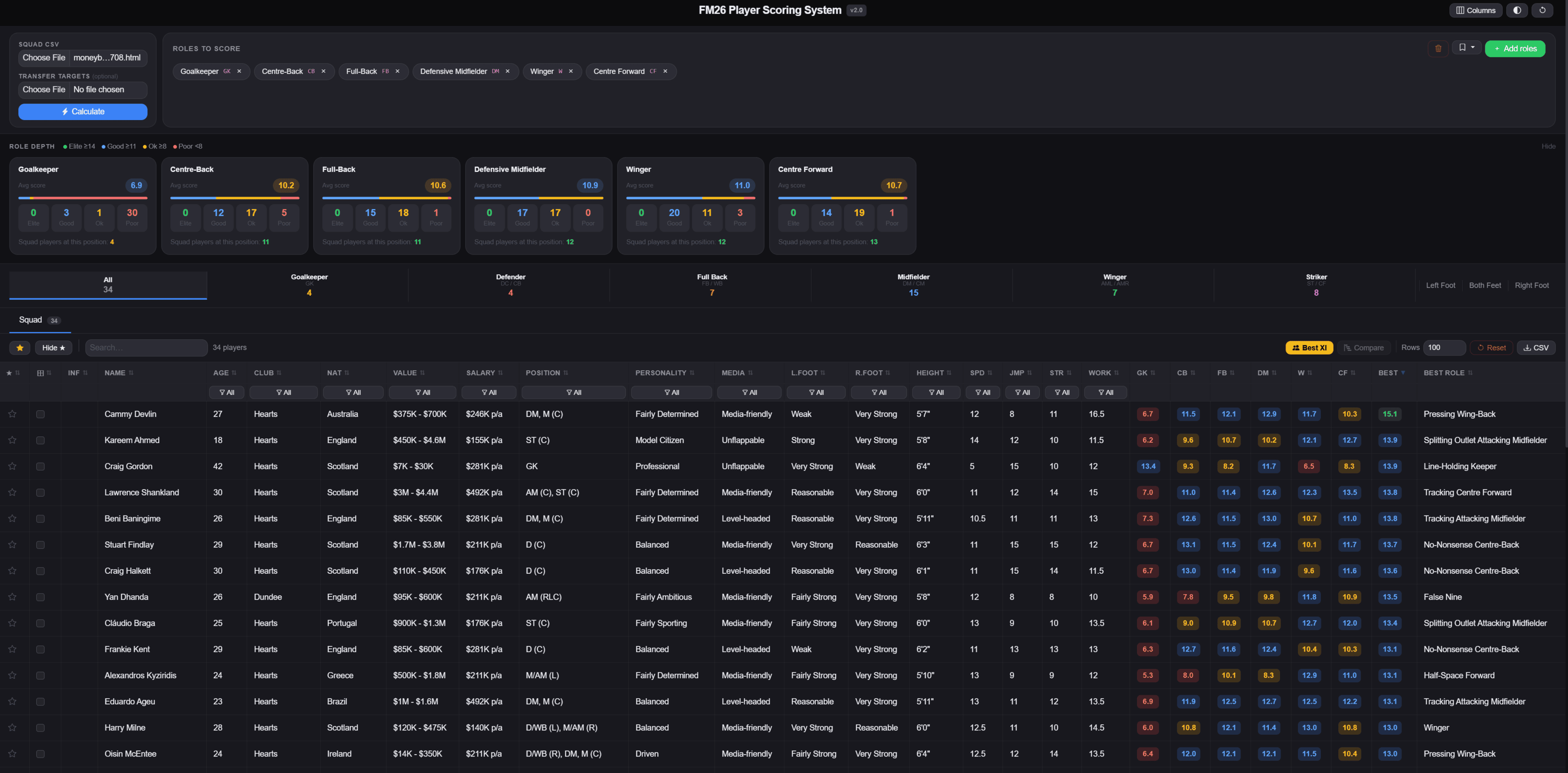
The FM26 Player Scoring System is a free browser-based tool that scores every player in your squad against any role you choose. Instantly see who fits your system and where you need reinforcements.

No install required. Just open the HTML file in your browser.


FEATURES

- Scores every player against up to 85 FM26 roles
- Role Depth panel shows Elite / Good / Ok / Poor counts per position
- Best XI auto-selects the best player per slot across 14 formations
- Player Comparison with side-by-side attribute bars and role scores
- Transfer Targets tab to score potential signings separately
- Role Presets to save your favorite role combinations
- Column hiding, position filters, foot filters and age range filter
- Works fully offline

REQUIREMENTS

You need one thing before using this tool. It's required to export player data from FM26 as a CSV.
FM26 Player Export mod (by vinteset)
The FM26 export views are included in the download, just drop them into your FM26 views folder and you're good to go.

HOW TO GET STARTED

Step 1 — Install the FM26 Player Export mod
Download and install the mod from the link above. This is a BepInEx plugin that adds a keyboard shortcut to export any player list directly to CSV. Full install instructions are on the FM Scout page.

Step 2 — Install the export views
Extract the zip file and move the .fmf view files into your FM26 views folder.
Windows: Documents\Sports Interactive\Football Manager 2026\views
Mac: ~/Documents/Sports Interactive/Football Manager 2026/views
Restart FM26 or reload views from in-game settings.

Step 3 — Export your squad from FM26
Open your Squad screen, select the FM26 Player Scoring view from the view dropdown, then press the export shortcut. Save the CSV somewhere easy to find.

Step 4 — Load the tool
Open fm26_player_scoring_system_v1.0.html in your browser. Click Choose File next to Squad CSV, select your export, pick the roles you want to score against, then click Calculate.

That's it. Every player is now scored against every role you selected.

TRANSFER TARGETS

Export from the Player Search screen using the same mod and load it as the Transfer Targets file. Targets get their own tab with full scoring, their own Best XI and their own Compare tool.

Compatible with FM26 exports. Also works with FM24 exports.


Updates:

-Added all FM26 roles with the new In Possession / Out of Possession system
-FM24 roles kept under a Legacy tab
-Best XI updated to use FM26 roles and correctly assigns players by position
-Player cards and pitch circles color coded by position


Credits:

Built on the original FM24 scorer by squirrel_plays, HarrisonRClark and Fatheed7.

Download Now
Downloads: 1640 / Size: 40.4 kB / Added: 2026-03-16
Your content on FM Scout

We are always looking for quality content creators, capable of producing insightful articles. Being published here means more exposure and recognition for you.

Do YOU have what it takes?

Discussion: FM26 Player Scoring System — Role Scorer and Squad Analyser

35 comments have been posted so far.

  • fabi2190's avatar
    I export the Squad Attribute Export and then import in your File and always says no Players found
  • RPGFan's avatar
    Also does this work if I'm playing on a mac ?
  • RPGFan's avatar
    @JGdaCaesar exactly that is what I meant, thanks. Also bc if it suits their attributes it does not take away too many of their PA when retraining them.
    1
  • JGdaCaesar's avatar
    @RPGFan, unless I’m misunderstanding what you mean, that’s exactly what the tool is for. You can rate any player against any role or set of roles and use that to decide whether it makes sense to retrain them for a different position.

    The in game position/role rating is not factored in. The tool only looks at the player’s actual attributes. So, for example, if a player has the attributes of a striker but the game lists them as a defender, the tool will still show that their best role is striker based on things like pace, finishing, anticipation, and other relevant stats.
  • RPGFan's avatar
    @JGdaCeasar I see, however I think sometimes is more helpful and better to see if a player would be better being retained in another similar role which they have not mastered yet, keeping them versatile and able to play in more position when you only have limited subs.
  • JGdaCaesar's avatar
    @RPGFan no it does not, this works similarly to the fm24 one where it takes their attributes and grades how good they are in the role. In my testing role familiarity isn’t that important, players usually adapt to new roles relatively quickly.
  • RPGFan's avatar
    I wonder does this also takes into consideration the positioning that the player has ? I mean in terms of a player having everything to be a midfielder but maybe only 15 in that position vs 20 in another ?
  • andrewcoates77's avatar
    @JGdaCaesar - Thank you so much for quick reply - yeah all good now - Thank you for the good work
    1
  • JGdaCaesar's avatar
    @andrewcoates77 I accidentally uploaded the wrong file. Redownload the mod and it should have the new roles + the old ones
    1
  • andrewcoates77's avatar
    There is no fm26 roles in the scoring? - It still has defend and support roles?
    1

FMS Chat

Stam
hey, just wanted to let you know that we have a fb style chat for our members. login or sign up to start chatting.