


No install required. Just open the HTML file in your browser.
FEATURES
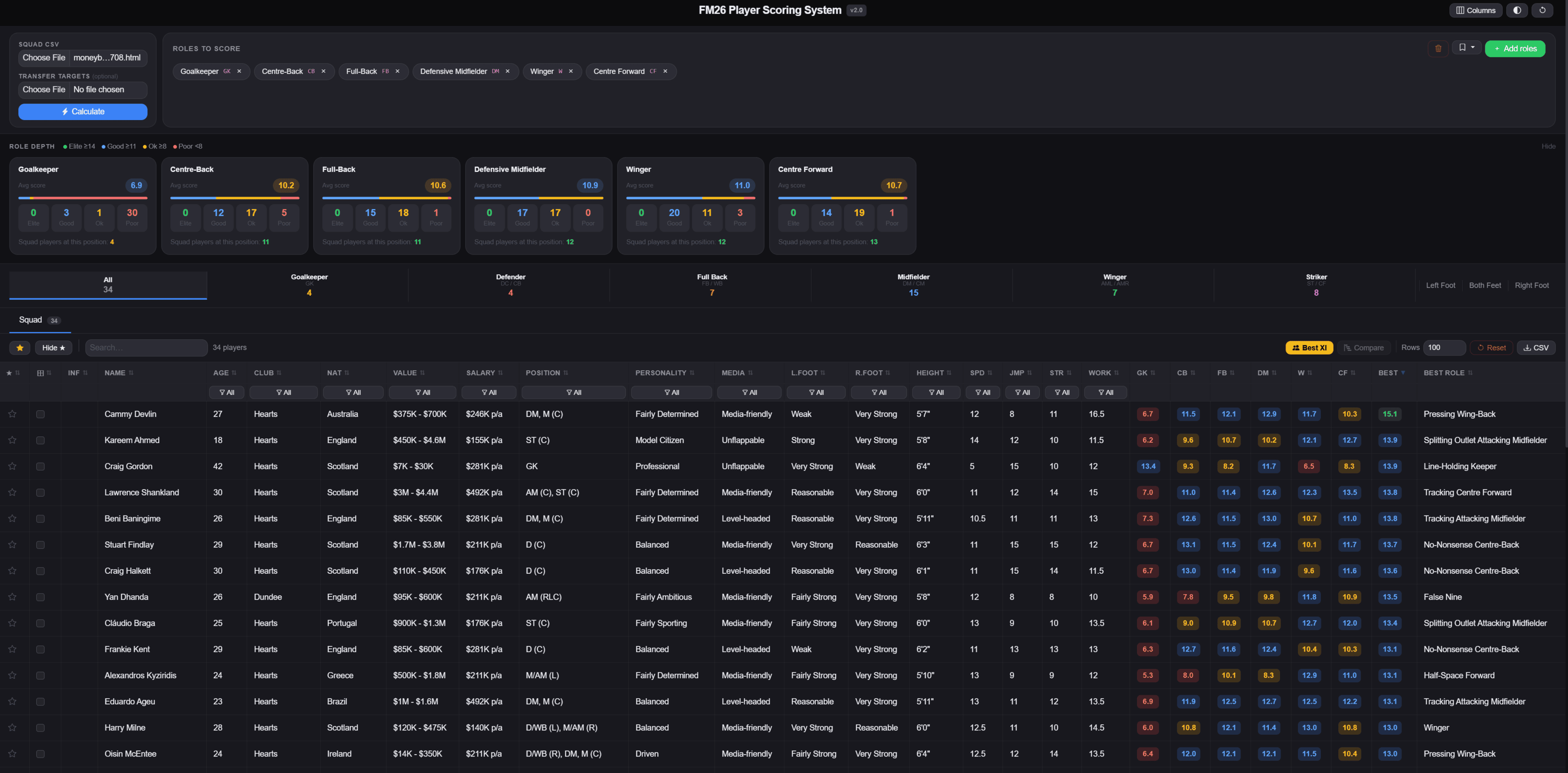
- Scores every player against up to 85 FM26 roles- Role Depth panel shows Elite / Good / Ok / Poor counts per position
- Best XI auto-selects the best player per slot across 14 formations
- Player Comparison with side-by-side attribute bars and role scores
- Transfer Targets tab to score potential signings separately
- Role Presets to save your favorite role combinations
- Column hiding, position filters, foot filters and age range filter
- Works fully offline
REQUIREMENTS
You need one thing before using this tool. It's required to export player data from FM26 as a CSV.FM26 Player Export mod (by vinteset)
The FM26 export views are included in the download, just drop them into your FM26 views folder and you're good to go.
HOW TO GET STARTED
Step 1 — Install the FM26 Player Export modDownload and install the mod from the link above. This is a BepInEx plugin that adds a keyboard shortcut to export any player list directly to CSV. Full install instructions are on the FM Scout page.
Step 2 — Install the export views
Extract the zip file and move the .fmf view files into your FM26 views folder.
Windows: Documents\Sports Interactive\Football Manager 2026\views
Mac: ~/Documents/Sports Interactive/Football Manager 2026/views
Restart FM26 or reload views from in-game settings.
Step 3 — Export your squad from FM26
Open your Squad screen, select the FM26 Player Scoring view from the view dropdown, then press the export shortcut. Save the CSV somewhere easy to find.
Step 4 — Load the tool
Open fm26_player_scoring_system_v1.0.html in your browser. Click Choose File next to Squad CSV, select your export, pick the roles you want to score against, then click Calculate.
That's it. Every player is now scored against every role you selected.
TRANSFER TARGETS
Export from the Player Search screen using the same mod and load it as the Transfer Targets file. Targets get their own tab with full scoring, their own Best XI and their own Compare tool.Compatible with FM26 exports. Also works with FM24 exports.
Updates:
-Added all FM26 roles with the new In Possession / Out of Possession system-FM24 roles kept under a Legacy tab
-Best XI updated to use FM26 roles and correctly assigns players by position
-Player cards and pitch circles color coded by position








Discussion: FM26 Player Scoring System — Role Scorer and Squad Analyser
37 comments have been posted so far.
It's a shame, though, because I had translated the entire old file into Italian.
And i got this error too https://ibb.co/PvKJnZsv
@albertseriksen If you are windows make sure you have the right bepinex, should be called "bepinex-unity.il2cpp-win-x64"
My folders looks like it has the right setup (common-Football Manager 26-BepInEx-plugins-FM26PlayerExport-FM26PlayerExport.dll.
But when launcing the game through Steam, nothing happens. No Console opens up, no shortcuts work (F8/F9). Can someone please tell me what i'm doing wrong.
Im open to be instructed på Discord or etc.